
PF Challan Generator: How to Generate Error Free EPF Challans & ECR files in 2026
TL;DR: PF Challan Generator in 2026
- PF Challan Generators automate EPF compliance by calculating PF contributions, generating ECR files, and creating EPFO-ready challans.
- Employee PF contribution is 12%, while employer contributions are split between EPF, EPS, and EDLI as per EPFO regulations.
- ECR filing and PF payment are due by the 15th of the following month, making timely payroll processing essential.
- Common compliance errors include invalid UANs, EPS wage ceiling mistakes, duplicate employee records, and contribution mismatches.
- Automated payroll software reduces errors, saves administrative time, and improves compliance accuracy through built-in validations and reporting.
- INDPayroll simplifies PF filing by generating ECR files, supporting TRRN tracking, maintaining audit records, and streamlining monthly EPF compliance workflows.
Managing Provident Fund compliance is critical for HR and payroll teams in India. Every month, employers must calculate contributions, prepare ECR files, upload them to the EPFO portal, and complete payments within statutory deadlines. Manual processes result in errors, missed deadlines, and compliance complications. A PF Challan Generator is a software solution that automates this entire process-automatically calculating contributions, validating employee UANs, generating ECR files, creating EPF challans, and tracking TRRN numbers-while maintaining complete audit compliance.
This comprehensive guide covers everything HR and payroll professionals need to know about PF challan generation, ECR filing procedures, TRRN generation, and payroll automation.
What is a PF Challan Generator?
A PF Challan Generator is software that automates the process of calculating PF contributions, generating ECR (Electronic Challan cum Return) files, and creating PF challans for EPFO compliance.
Instead of manual spreadsheet work, the software calculates contributions automatically based on payroll data, validates employee UANs against the EPFO database, generates ECR-compliant files in XML/CSV format, creates challans with accurate contribution amounts, tracks TRRN numbers for payment verification, maintains compliance records centrally, and generates audit-ready reports with complete documentation trails.
The primary objective is to eliminate manual errors while ensuring timely compliance and maintaining audit trails for regulatory reviews.
Why Businesses Need a PF Challan Generator
Organisations face significant challenges: manual contribution calculations are prone to errors, UAN mismatches cause ECR rejection and filing delays, duplicate employee records lead to overpayment and compliance issues, ECR formatting errors trigger portal rejection, missed deadlines can result in interest and damages, reconciliation gaps cause audit complications, and manual processes become unmanageable at 50+ employees.
As explained in our guide on 15 Payroll Mistakes HR Managers Should Avoid, even small data entry errors in PF calculations can snowball into costly compliance issues.
A modern PF Challan Generator helps address these challenges through built-in validation, error detection, and automated workflows.
Understanding PF Contributions (2026 Rates)
Employee contribution is 12% of basic salary plus dearness allowance (DA), deducted during payroll and credited to the employee’s EPF account. To understand how salary components like Basic Pay and DA are structured, refer to our detailed guide.
Employer contribution is 12% of PF wages, allocated as: Employer EPF (3.67%), Employer EPS (8.33%), and EDLI (0.5%), per EPFO Scheme 1995. You can use our free PF Calculator to instantly compute these contribution amounts.
IMPORTANT – EPS Wage Ceiling: The EPS wage ceiling is Rs. 15,000 per month (not Rs. 21,000 as commonly misunderstood). Employer EPS contribution (8.33%) is generally capped at Rs. 1,250 per month. This is a critical compliance requirement. For the full breakdown of EPF regulations and statutory rates, visit our compliance page.
For example, an employee with basic salary Rs. 25,000 and DA Rs. 5,000 generates: Employee PF = Rs. 30,000 × 12% = Rs. 3,600; Employer EPF = Rs. 30,000 × 3.67% = Rs. 1,101; Employer EPS = Rs. 15,000 × 8.33% = Rs. 1,250 (wage ceiling applied); EDLI = Rs. 30,000 × 0.5% = Rs. 150. Accurate application of these rules is critical for compliance. Our PF Calculator India 2026 guide walks through these calculations in detail.
What is an ECR File?
Electronic Challan cum Return (ECR) is the mandatory monthly return filed with EPFO containing employee-wise contribution details. The ECR system streamlined compliance reporting into a single unified submission.
An ECR file includes UAN, employee name, wages (gross, EPF, EPS, EDLI), contributions, NCP (Non-Contributory) days, and refund amounts. EPFO accepts XML or CSV formats per official specifications. Before accepting an ECR and issuing TRRN, the portal validates: UAN records against the EPFO member database, contribution amounts follow statutory percentages, wage ceiling application to EPS, NCP days don’t exceed calendar days, and file format matches the official structure.
How to Generate PF Challan Online: 10 Steps
- Process Payroll: Finalise salary processing with accurate wage calculations per EPFO guidelines.
- Verify Data: Check all UAN numbers against the EPFO database, employment status, and joining/exit dates.
- Calculate Contributions: Use automated payroll software to calculate employee and employer contributions as per statutory rates.
- Generate ECR: Export ECR in XML or CSV format from the integrated payroll system.
- Upload to EPFO: Log into the EPFO Employer Portal and upload the ECR file.
- Portal Validates: EPFO system checks UAN validity, contribution amounts, wage ceiling application, and file format compliance.
- TRRN Generation: After successful validation, EPFO issues a TRRN (Temporary Return Reference Number).
- Generate Challan: EPFO automatically creates a PF challan with TRRN, employer details, contribution amount, and payment instructions.
- Make Payment: Pay through EPFO-authorised banks by the statutory due date to comply with filing requirements.
- Document & Reconcile: Download receipts from the EPFO portal, maintain records, and reconcile payroll, ECR, challan, and bank amounts.
Filing Deadlines and Compliance
The statutory due date for ECR filing and PF payment is the 15th of the following month. Extensions may occasionally be announced by EPFO for specific months, but there is no standard permanent grace period. Delayed filing may result in interest under Section 7Q (typically 12% per annum) and damages under Section 14B.
To stay on top of all statutory deadlines, use our free Compliance Calendar. For a broader understanding of laws governing payroll in India, read our post on Payroll Compliance 101: Key Laws Every Business Must Follow. For the latest deadline information, refer to the EPFO Official Portal.
Common ECR Errors to Avoid
- Invalid or inactive UANs are a major cause of ECR rejection-verify all UANs before ECR generation.
- Wage mismatch occurs when payroll wages differ from ECR amounts-reconcile reports before upload.
- EPS contribution errors happen when the Rs. 15,000 wage ceiling is not applied correctly-always cap EPS calculations at this limit.
- Duplicate employee records cause overpayment-clean master data before ECR generation.
- Incorrect NCP days result from unsynced attendance data-match leave records with payroll.
- Contribution mismatches occur from calculation errors-perform reconciliation before upload.
Real-World Example: Why Accuracy Matters
A mid-sized manufacturing company with 150 employees filed ECR manually for 3 years, averaging 8-12 errors per month. Common issues: invalid UANs (3-4 cases), wage mismatches (2-3 cases), and NCP day errors (1-2 cases).
This resulted in Rs. 45,000 in annual penalties, 15 hours of monthly admin time, and audit complications. After implementing a PF Challan Generator, errors dropped to zero, processing time reduced drastically, and compliance became 100% certified. This demonstrates the value of automation for mid-market organisations. Similar benefits are described in our guide on 15 Proven Payroll Best Practices for Indian SMEs.
How to Generate PF Challan Using INDPayroll
Step 1 → Log in to INDPayroll
Step 2 → Update Employee PF Details (UAN, PF Number, EPS Number)
Step 3 → Configure Salary Components and group for PF eligibility
Step 4 → Add employee salary
Step 5 → Run Monthly Payroll (Payroll → Run Payroll → Generate)
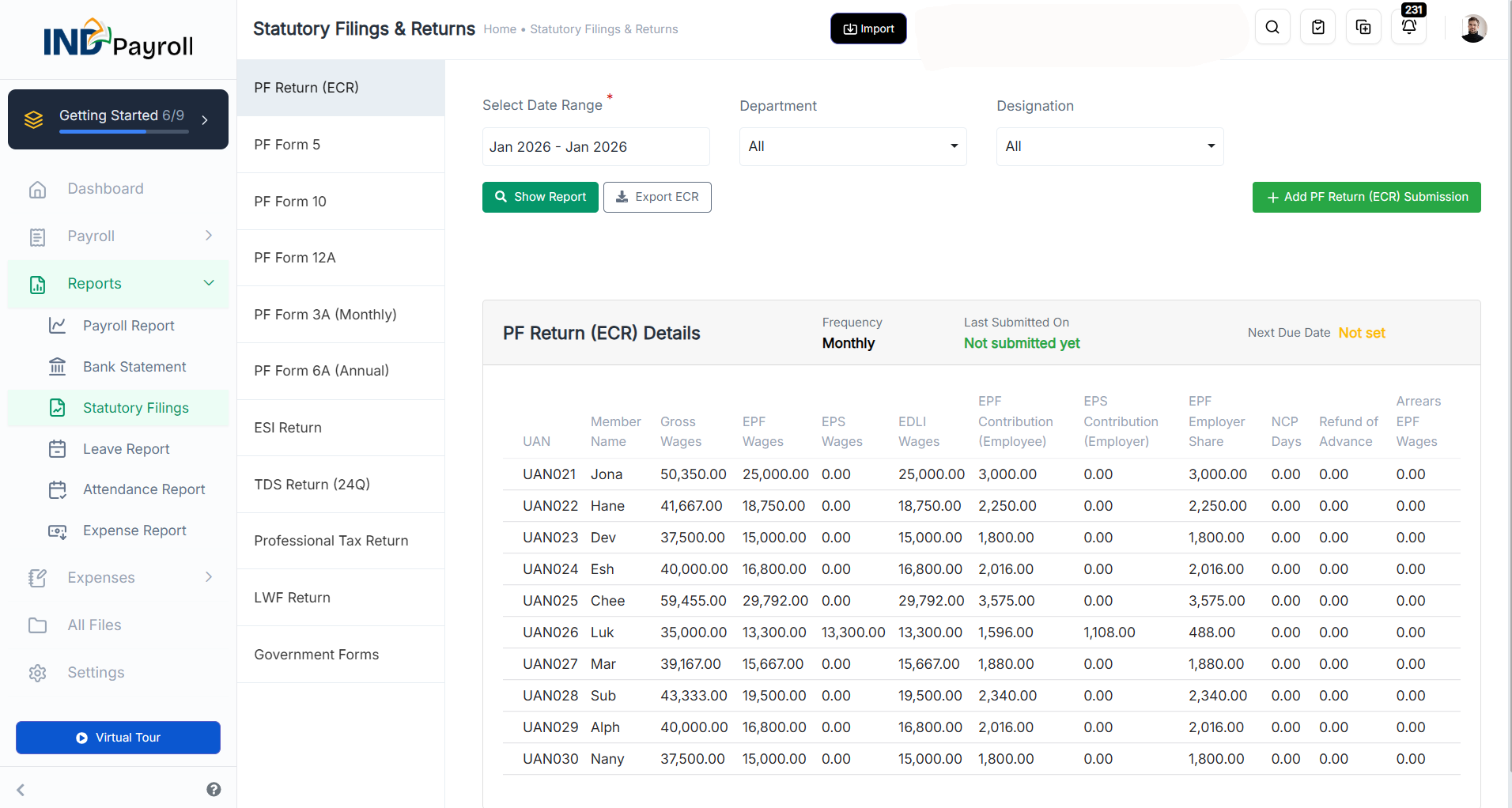
Step 6 → Go to Reports → Statutory Filings → PF Return (ECR)
Step 7 → Select Date Range, Department, Designation filters
Step 8 → Click Show Report → Verify ECR data table
Step 9 → Click Export ECR → Download .txt file
Step 10 → Upload .txt file to EPFO Portal → Get TRRN
Step 11 → Generate PF Challan on EPFO Portal
Step 12 → Make Payment (Net Banking / NEFT)
Step 13 → Record submission in INDPayroll (Add PF Return ECR Submission)
INDPayroll also supports similar automated filing for ESI contributions. If you manage both PF and ESI for employees, refer to our guide on How to Generate ESI Challan Online for a parallel walkthrough.
Benefits of Automation
Automated systems reduce processing time compared to manual methods, improve accuracy through built-in validation, reduce manual data entry errors, prevent UAN validation failures through database verification, apply contribution rules correctly, detect errors before EPFO submission, generate audit-ready reports, and help maintain compliance records. Centralised records simplify audits, and the system scales easily for organisations of different sizes.
For HR teams looking to streamline all aspects of payroll-not just PF-our article on TDS on Salary: How to Calculate It Correctly in 2026 provides complementary guidance on managing income tax deductions alongside PF compliance.
Conclusion
PF compliance requires accuracy and timely execution at every step. Manual filing processes can lead to errors and delays. Modern payroll software helps automate calculations, validate employee data, and streamline monthly filings in accordance with EPFO standards. For organisations with multiple employees, automation can help reduce manual errors and simplify compliance processes.
Ready to eliminate PF compliance errors? Explore INDPayroll’s PF & ES Compliance module and run your first error-free ECR filing today.
Frequently asked questions
Run your next payroll in 15 minutes
Trusted by 1,000+ Indian businesses to run compliant payroll, automatically.
Keep reading
18 June 2026 · 14 min
Compliance20 March 2026 · 5 min
Compliance23 June 2026 · 8 min