
Employee Self-Service Portal Save Time & Empower Employees
TL;DR:
- Employees can access payslips, leave, attendance, and expenses without HR assistance.
- HR saves time by automating repetitive payroll and HR requests.
- Businesses gain better transparency, faster approvals, and improved compliance.
- Key features include mobile access, RBAC, digital payslips, and attendance tracking.
- A successful rollout requires proper setup, training, and phased implementation.
- INDPayroll combines ESS, payroll, attendance, and statutory compliance in one platform.
Every HR manager knows this moment: an employee walks over again to ask for last month’s payslip, or messages on WhatsApp asking how many leave days are left. None of these questions are hard to answer – but answered fifty times a month, across fifty employees, they quietly eat entire workdays.
An Employee Self-Service Portal (ESS Portal) exists to remove that friction – not by adding another dashboard nobody opens, but by putting payslips, leave balances, attendance records, and company updates directly in employees’ hands, on their phone or laptop, whenever they need them.
This guide is written for HR managers, payroll managers, business owners, and growing teams across IT, retail, manufacturing, healthcare, and CA firms evaluating an ESS Portal and how to roll one out correctly – covering what it is, the problems it solves, common pitfalls, how to decide if you’re ready, and how INDPayroll’s Employee Self-Service Portal fits in.
Simplify HR With a Modern ESS Portal
What Is an Employee Self-Service Portal?
Quick Answer: An Employee Self-Service Portal (ESS Portal) is a secure online system that lets employees view payslips, apply for leave, check attendance, and manage routine HR tasks themselves, without contacting HR for each request.
An ESS Portal is a secure online workspace where employees independently manage routine HR and payroll tasks – without emailing, calling, or walking up to the HR desk. Employees log in on web or mobile and find what they need directly, instead of routing every request through HR.
Employee self-service software typically covers:
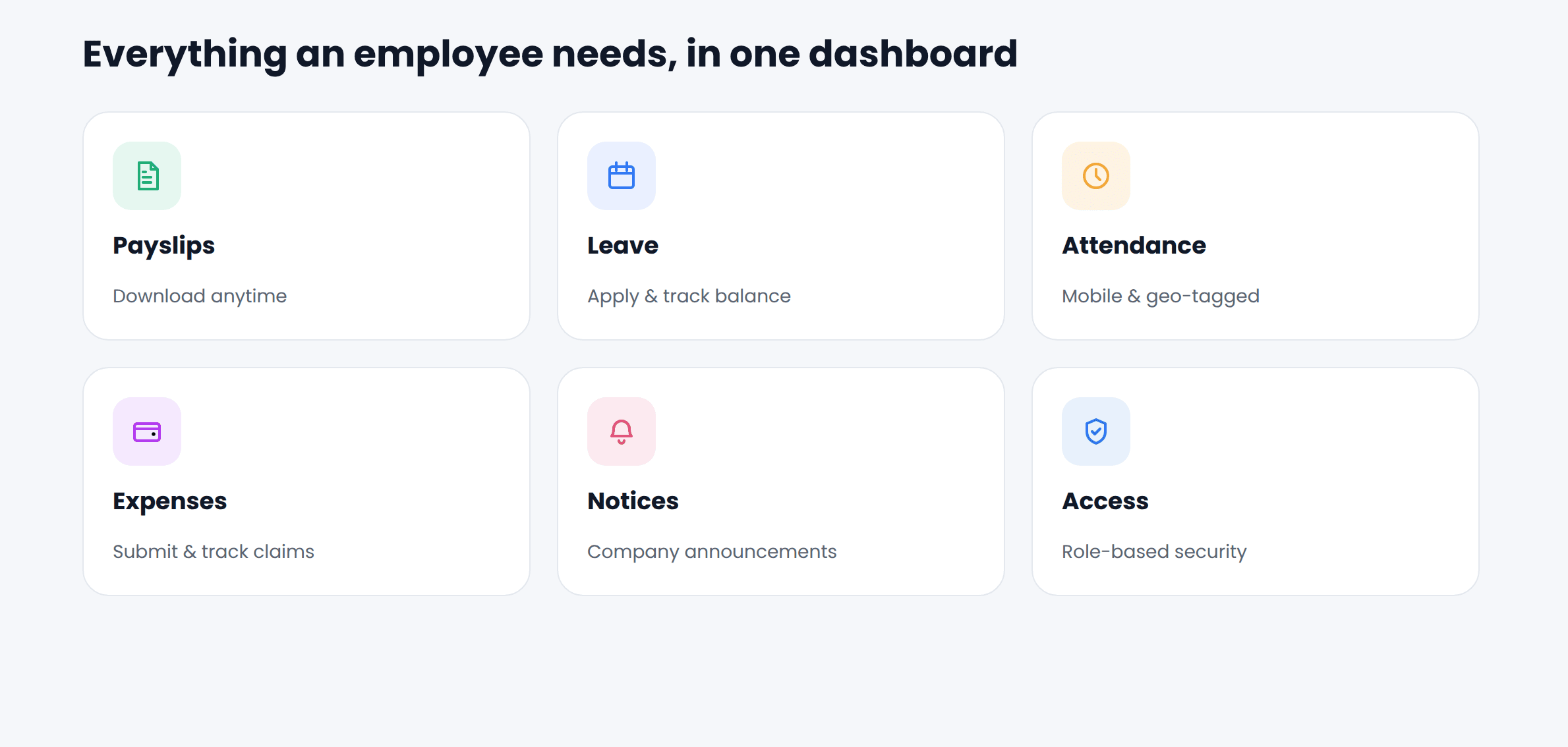
- Viewing and downloading digital payslips
- Applying for and tracking leave requests
- Checking attendance and working hours
- Viewing the company holiday calendar
- Submitting expense or reimbursement claims
- Reading company announcements
- Viewing personal and salary details
In India, an HR Self-Service Portal also needs to reflect statutory realities – PF, ESI, Professional Tax, and TDS deductions – so employees see exactly how their salary is calculated, not just what lands in their bank account. This is where generic global HRMS tools sometimes fall short, and where India-specific payroll software is built differently from day one.
Why Modern Businesses Need an ESS Portal
Quick Answer: Businesses need an ESS Portal because manual HR processes don’t scale – past a certain headcount, repetitive payslip, leave, and attendance requests consume more HR time than the business can spare.
Problem. Past a handful of employees, HR and payroll teams can’t handle every leave request, payslip query, and attendance correction manually while still doing policy work, compliance filing, and hiring.
Business Impact. Every hour HR spends resending payslips or explaining a leave balance is an hour not spent on retention, compliance accuracy, or workforce planning – a cost that compounds fast for lean HR teams in SMEs and startups.
Best Practice. Businesses that scale HR sustainably shift repetitive, low-judgment tasks to employees themselves, while HR keeps oversight, approvals, and exception handling.
In Practice. INDPayroll’s Employee Self-Service Portal, available on the Ultimate plan, is built around exactly this shift – digital payslips, leave and attendance visibility, and expense submission move to the employee, while HR retains control through role-based access. It isn’t a bolt-on: it sits inside the same platform that already handles payroll processing and PF/ESI/TDS compliance.
Common HR Problems Without ESS
Quick Answer: Without an ESS Portal, businesses typically face repeated payslip requests, leave approval delays, attendance disputes, payroll query overload, lost expense claims, missed announcements, and onboarding paperwork chaos.
Without a self-service layer, HR and payroll teams tend to run into the same problems, regardless of industry.
| HR Problem Without ESS | Why It Happens | Who It Affects Most |
| Repeated payslip requests | No central place to retrieve past payslips | HR, payroll teams |
| Leave approval delays | Paper forms or scattered emails/WhatsApp messages | Employees, managers |
| Attendance disputes | Manual registers or disconnected biometric logs | Manufacturing, retail |
| Payroll query overload | Employees can’t see how salary was calculated | Payroll, finance |
| Lost expense claims | Physical bills, no tracking, delayed reimbursement | Sales, field staff |
| Missed company updates | No shared notice board, reliance on email chains | All employees |
| Onboarding paperwork chaos | Manual document collection for every new hire | HR, new employees |
Business Impact. Each problem individually seems small. Together, they keep HR permanently reactive – answering questions instead of improving processes.
Best Practice. Track every recurring HR request for a month. Anything asked repeatedly is a strong candidate to move into self-service.
In Practice. Digital payslip dispatch removes repeated payslip requests, built-in leave and holiday management removes approval delays, and mobile/geo-tagged attendance tracking reduces disputes – all inside one system rather than five disconnected tools.
How an ESS Portal Benefits Employees
Quick Answer: Employees benefit from instant payslip access, real-time leave and attendance visibility, faster reimbursements, and full clarity on how their salary is calculated – without waiting on HR.
Employee experience directly affects retention, especially in competitive hiring markets like IT services and healthcare staffing.
| Employee Benefit | What It Looks Like Day-to-Day |
| Instant payslip access | Download any month’s payslip in seconds |
| Leave transparency | See balance, holiday calendar, and approval status live |
| Attendance visibility | Check in/out records and correct discrepancies early |
| Faster reimbursements | Submit claims from a phone, track approval status |
| Salary clarity | See exact PF, ESI, PT, and TDS breakdowns on every payslip |
| Reduced dependency on HR | Get answers without waiting for someone to be available |
| Company connection | See notices and holiday lists in one place |
Problem. When employees can’t access basic information about their own employment, it creates quiet frustration even without a formal complaint.
Best Practice. Give employees direct, real-time visibility into anything affecting their pay, leave, or attendance – transparency reduces mistrust faster than any HR communication effort.
In Practice. Every payslip generated through INDPayroll is dispatched digitally and stays available in the self-service portal, itemizing PF, ESI, PT, and TDS, so employees know exactly how their net pay was calculated.
How an ESS Portal Helps HR Teams
Quick Answer: An ESS Portal helps HR teams by replacing manual, one-off requests with self-service workflows – for leave, attendance, and payslips – freeing HR to focus on hiring, policy, and compliance instead of paperwork.
Problem. HR teams in growing companies are often understaffed relative to headcount, and manual processes don’t scale linearly – doubling employees can triple the manual workload.
| HR Team Benefit | Manual Process Replaced |
| Fewer repetitive queries | One-off payslip and leave-balance requests |
| Centralized employee database | Scattered spreadsheets or physical files |
| Automated leave workflows | Manual leave form collection and tracking |
| Self-reported attendance data | Manual register entry and reconciliation |
| Scheduled reports | Manually compiling monthly reports |
| Simplified compliance tracking | PF, ESI, PT, LWF, and TDS handled separately |
Best Practice. HR teams that reduce administrative load usually consolidate employee data, attendance, leave, and payroll into one system, not five.
In Practice. The platform pairs the Employee Self-Service Portal with Employee Onboarding & Database, Leave & Holiday Management, and Attendance Tracking in one platform. HR configures policies once; employees interact with the portal directly; Scheduled Reports keep management updated automatically.
Benefits for Business Owners & Managers
Quick Answer: Owners and managers get real-time visibility into attendance, leave, and payroll costs through an ESS Portal, along with role-based reporting that reduces both compliance risk and administrative overhead.
Problem. Owners and managers often lack real-time visibility into attendance, leave, and payroll costs – they find out about problems after the fact.
| Manager/Owner Benefit | Why It Matters |
| Real-time attendance and shift visibility | Better workforce planning, fewer surprises |
| Payroll register and reports on demand | Faster financial reconciliation |
| RBAC-controlled access | Managers see only what’s relevant to their team |
| Reduced compliance risk | PF, ESI, PT, LWF, and TDS handled systematically |
| Lower administrative overhead | HR time redirected to higher-value work |
| Excel/PDF export | Easy sharing with accountants or auditors |
Best Practice. Give managers self-serve access to reports and attendance data relevant to their own team, instead of routing every request through HR.
In Practice. Role-Based Access Control lets owners and managers see exactly the data relevant to their scope, while Excel/PDF export makes it simple to share figures with accountants or leadership without re-entering data.
Essential Features Every ESS Portal Should Have
Quick Answer: A complete ESS Portal should cover digital payslips, leave management, web and mobile attendance, geo-tagged attendance, shift rosters, expense reimbursement, a notice board, role-based access, mobile access, and payroll transparency – not payslips alone.
Not every “ESS Portal” on the market covers the same ground. Check any option – including your current one – against this list.
| Feature | Why It Matters |
| Digital payslip access | Employees retrieve pay history without HR involvement |
| Leave application & approval | Removes paper forms, speeds up manager decisions |
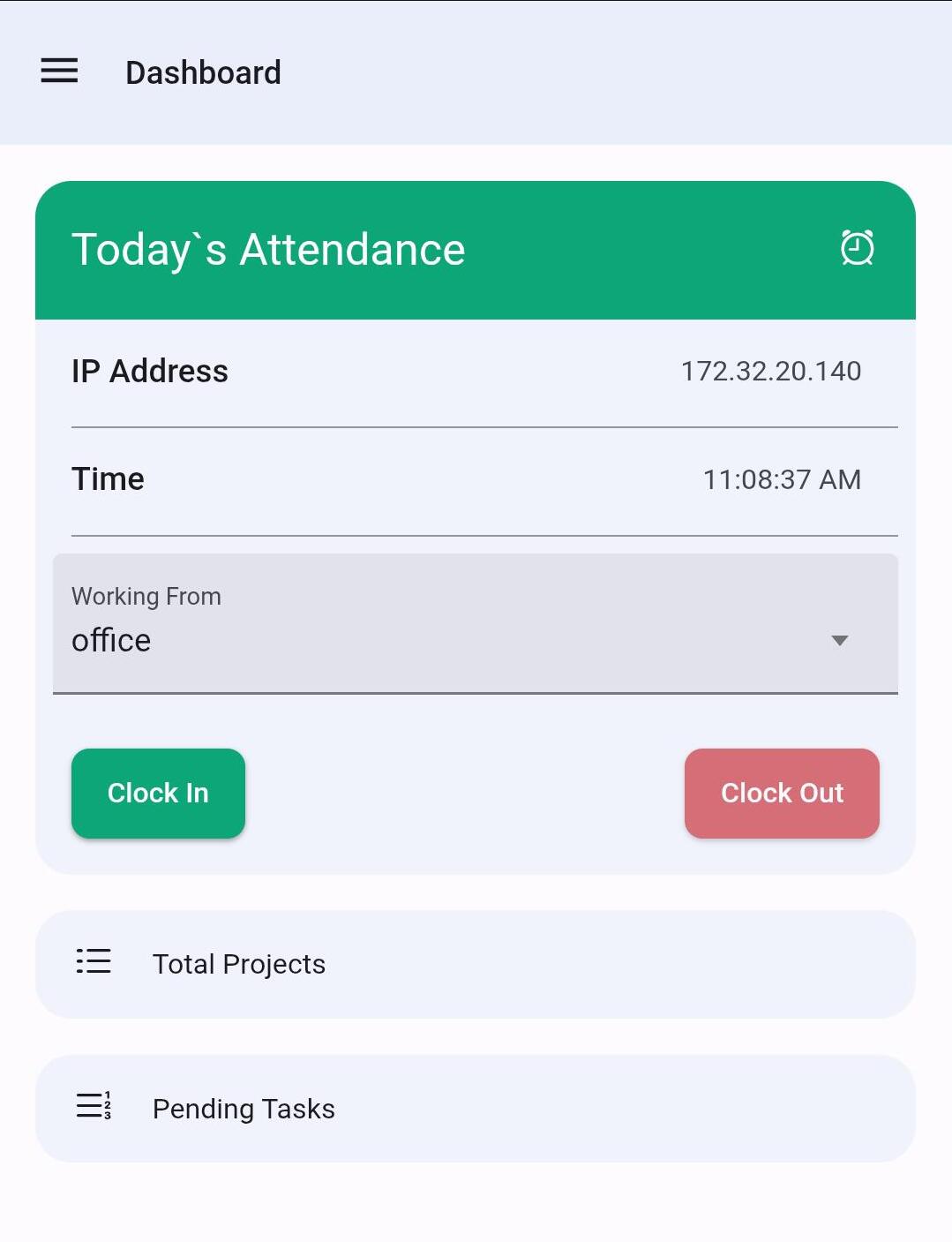
| Attendance tracking (web & mobile) | Reduces disputes, supports field/remote teams |
| Geo-tagged attendance | Verifies location for field staff and multi-site teams |
| Shift roster visibility | Employees always know their schedule |
| Expense & reimbursement submission | Faster claims, less paperwork loss |
| Company notice board | One source of truth for announcements |
| Role-based access control | Data visibility matches organizational hierarchy |
| Mobile access | Usable outside the office, not desk-bound |
| Payroll transparency | Builds trust in how salary is calculated |
Problem. Businesses sometimes adopt a portal that only covers payslips, then discover employees still go through HR for leave, attendance, or expenses.
Best Practice. Treat the table above as a minimum bar, not a wish list, before signing up for any employee self-service software.
In Practice. The Ultimate plan bundles the full Employee Self-Service Portal with attendance tracking, geo-tagged attendance, shift rosters, expense management, a notice board, and RBAC – covering the entire list rather than payslips alone.
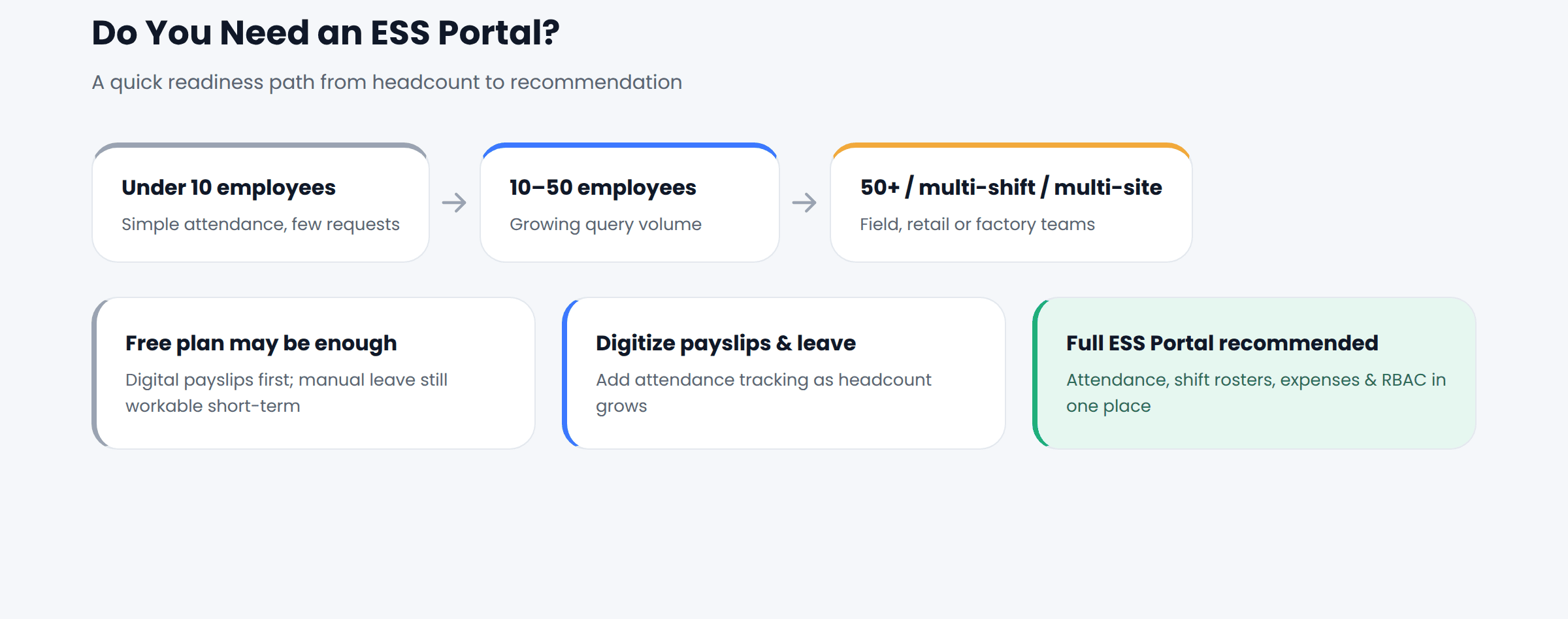
Do You Need an ESS Portal? A Decision Framework
Quick Answer: If your team has grown past roughly 10-15 employees, spans multiple shifts or locations, or your HR team spends more than a few hours a week on payslips, leave, or attendance requests, you’re past the point where manual processes scale – it’s time for an ESS Portal.
Use the framework below instead of guessing. It maps common business situations to a practical next step.
| Your Situation | Recommended Approach |
| Under 10 employees, simple attendance, few leave requests | A free plan with basic payroll and digital payslips may be enough for now |
| 10–50 employees, growing query volume, one location | Digitize payslips and leave first; add attendance tracking as headcount grows |
| 50+ employees, multiple shifts or locations | Full ESS Portal with attendance, shift rosters, and RBAC becomes worth the investment |
| Field, retail, or factory-floor workforce | Prioritize mobile access and geo-tagged attendance over a desktop-only portal |
| CA firm or consultant managing multiple client payrolls | Choose software with per-client accounts and India-specific compliance built in |
| High statutory complexity (PF, ESI, PT across states) | Pick ESS software with compliance automation, not a generic global HRMS |
Readiness Self-Check
- HR spends more than a few hours weekly on repetitive payslip, leave, or attendance requests
- Employees are spread across shifts, locations, or field roles
- Leave and attendance records are still manual, paper-based, or scattered across tools
- Payroll calculations aren’t visible to employees, leading to recurring queries
- Growth plans over the next 12 months will add headcount faster than HR capacity
If three or more boxes apply, an ESS Portal will likely pay for itself in HR time saved within a few months.
How INDPayroll’s Employee Self-Service Portal Works
Quick Answer: INDPayroll’s ESS Portal is built into its core payroll and compliance engine, so employees see live payslip, leave, attendance, and shift data on web or mobile, with access controlled by role through RBAC.
INDPayroll’s ESS Portal extends its core payroll and compliance engine rather than sitting apart from it. Because payroll, attendance, leave, and compliance data already live in one system, the portal reflects current data, not a synced copy that lags behind.
Employees log in on web or mobile to view digital payslips, apply for leave, check attendance and shifts, submit expense claims, and read notices. Admins configure what each role can see through RBAC, and backend changes – a new salary component, an approved leave, an updated PF calculation – reflect automatically in the employee’s view.
The sections below cover each capability in turn.
Employee Onboarding Through ESS
Quick Answer: ESS-based onboarding moves document collection (PAN, bank details, address proof) to the employee, with HR reviewing and approving instead of manually transcribing every field.
New-hire onboarding is often the most paperwork-heavy HR process – collecting PAN, bank details, and address proof manually over email or physical forms, which delays first payroll runs and introduces data-entry errors. The better approach is moving document collection to the employee while HR reviews and approves. Employee Onboarding & Database centralizes new-hire data into a single employee database, feeding directly into payroll and compliance setup, so a new employee is ready for the next payroll cycle and portal access immediately.
Onboarding Checklist
- Collect PAN, bank details, and address proof digitally
- Assign the employee to the correct salary group
- Set up leave policy and holiday calendar access
- Configure shift roster, if applicable
- Grant role-based ESS portal access
Digital Payslips
Quick Answer: Digital payslips are generated each payroll cycle automatically and stored permanently in the ESS Portal, so employees can retrieve any past payslip without asking HR to resend it.
Manually generating and emailing payslips every cycle is repetitive and error-prone, and it creates a support queue of “please resend my payslip” requests. Payslips should generate each cycle automatically and stay permanently accessible – not depend on a one-time email. Digital Payslip Dispatch delivers payslips automatically, and historical copies remain accessible in the self-service portal, itemizing the same PF, ESI, PT, and TDS figures payroll uses internally.
Payslip Access Checklist
- Payslips generated automatically every cycle
- Accessible anytime through the ESS portal
- Salary components clearly itemized
- Statutory deductions shown transparently
- Historical payslips retained and downloadable
Leave Requests & Approval
Quick Answer: Employees apply for leave directly in the ESS Portal, see live balances and holiday calendars, and track approval status, instead of relying on paper forms or scattered messages.
Paper-based or WhatsApp-based leave requests get lost, delayed, or approved inconsistently across managers, which creates fairness concerns and an unreliable leave record. Leave policy should be codified in the system, with employees applying directly and managers approving with full visibility into balances. Leave & Holiday Management lets employees apply through the portal and see real-time balances, while HR maintains a consistent, policy-driven record.
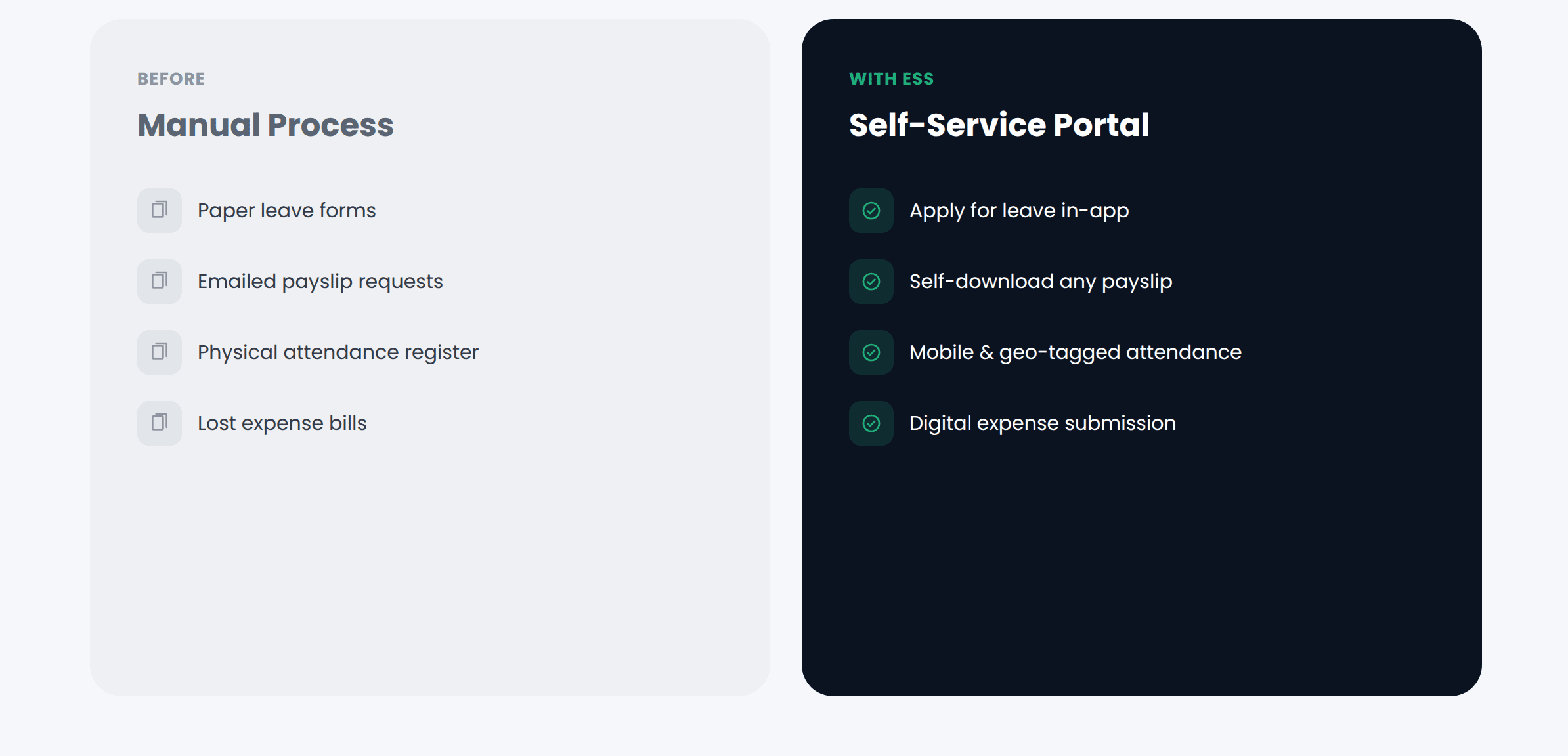
| Employee Request | Traditional Method | ESS Portal Method |
| Apply for leave | Paper form or email | Submit directly, see balance instantly |
| Check leave balance | Ask HR | View live in portal |
| View holiday calendar | Circulated notice/email | Always available in portal |
| Download payslip | Request from payroll team | Self-download anytime |
| Submit expense claim | Physical bills to finance | Upload and submit digitally |
| Check attendance | Ask HR/manager | View log directly |
| Read company announcement | Email or noticeboard | View in-app notice board |
Attendance Tracking
Quick Answer: ESS-based attendance tracking captures check-ins through mobile, web, geo-tagging, or biometric recognition, and feeds directly into payroll, removing manual registers and reconciliation.
Manual registers and disconnected biometric devices create reconciliation headaches, especially for manufacturing, retail, and field-based teams – and attendance errors flow straight into payroll errors. Attendance should be captured close to the source and flow into payroll with no manual re-entry. The platform offers mobile and web attendance tracking, geo-tagged attendance for field teams, and face/fingerprint recognition, with biometric attendance sync available as an add-on and attendance import for bulk uploads where hardware already exists.
Attendance Checklist
- Attendance method selected (mobile, web, biometric, geo-tagged)
- Shift roster configured for relevant teams
- Employees trained on check-in/check-out
- Attendance data confirmed to flow into payroll automatically
- Regularization process defined for missed punches
Shift Management
Quick Answer: A shift roster inside the ESS Portal shows employees their assigned schedule directly, and ties attendance to the correct shift automatically, instead of relying on printed or emailed rosters.
Businesses running multiple shifts – common in manufacturing, retail, and healthcare – struggle to communicate schedules and track shift-based attendance accurately, leading to missed shifts and pay disputes. Schedules should be visible to employees in advance, in the same place they check attendance and payslips. Shift Roster is visible directly in the portal, and attendance ties to the correct shift automatically.
Expense Reimbursement
Quick Answer: Employees submit expense claims directly through the ESS Portal and track approval status, replacing physical bills and manual forms that routinely get lost or delayed.
Physical bills and manual expense forms routinely get lost or delayed, a particular pain point for sales and field staff, and slow reimbursement is a recurring source of dissatisfaction. Submission and approval should happen in the same system employees already use for payslips and leave. Expense & Reimbursement Management lets employees submit claims through the portal with status tracking through approval, giving finance a centralized record instead of loose paperwork.
Company Announcements
Quick Answer: A company notice board inside the ESS Portal puts announcements where every employee already checks for payslips and attendance, improving the odds updates are actually seen.
Company updates often get buried in email or missed entirely by employees without regular email access, such as factory floor or field staff, which creates confusion and, for policy changes, potential disputes later. Announcements should live somewhere every employee checks routinely. The Company Notice Board sits inside the same portal employees already use for payslips and attendance, improving the odds updates are actually seen.
Payroll Transparency
Quick Answer: Payroll transparency means every payslip shows exactly how gross pay becomes net pay – PF, ESI, PT, and TDS included – so employees can verify their own salary instead of just questioning it.
When employees can’t see how their salary was calculated, they question even accurate payroll runs, and repeated “why is my salary different” queries consume payroll time and slowly erode trust. Best practice is to show the math, not just the result, every cycle. Formula-Based Salary Components and Salary Groups keep every payslip auditable, and the Payroll Register & Reports, with Excel/PDF export, give HR and employees a transparent view of how gross pay becomes net pay. For the compliance rules behind PF specifically, see INDPayroll’s EPF compliance page.
| ROI Area | Manual Process | With Self-Service |
| Payroll run time | Can take days of manual calculation | The company cites payroll completed in as little as 15 minutes versus roughly 3 days manually |
| Payslip distribution | Individually emailed or printed each cycle | Automated dispatch, self-download anytime |
| Leave & attendance queries | Handled one-by-one by HR | Employees self-check balances and logs |
| Compliance filing | Manually compiled PF/ESI/TDS data | Automated calculations and ready exports |
| Reporting | Manually compiled spreadsheets | Scheduled reports generated automatically |
Validate the payroll-run-time comparison against your own team size and process before treating it as a guarantee.
Role-Based Access & Security
Quick Answer: Role-based access control (RBAC) ensures employees see only their own data, managers see only their team’s, and admins retain oversight – the core security requirement for any ESS Portal.
Giving every employee, manager, and admin the same level of access to payroll data is a real security and compliance risk, and overexposed data can lead to privacy breaches or internal disputes. Access should always follow least privilege – employees see their own data, managers see their team’s, and HR/admin sees what their role requires. Role-Based Access Control ensures each group sees only what’s relevant to them.
Security Checklist
| Security Consideration | What to Verify |
| Role-based access control | Employees can only view their own data |
| Password-protected payslips | Sensitive salary data isn’t openly shared |
| Secure login | Portal requires authenticated login, not open links |
| Data segregation by role | Managers can’t see data outside their team |
| Audit trail | Changes to payroll/attendance data are traceable |
- Confirm RBAC is configured before go-live
- Test that employees cannot view colleagues’ payslips
- Verify manager access is scoped to their own team only
- Review who has admin-level access and why
- Set a process for revoking access when employees exit
Mobile Access
Quick Answer: Genuine mobile access lets employees check in, view payslips, apply for leave, and submit expenses from a phone, essential for field, retail, and shift-based staff who rarely sit at a desk.
Field staff, retail employees, and factory workers rarely sit at a desk, so a desktop-only portal effectively excludes them, and low mobile adoption keeps exactly those employees dependent on HR. Choose employee self-service software with genuine mobile access, not just a mobile-responsive web page. The platform supports mobile attendance tracking and mobile access to the self-service portal, so employees can check in, view payslips, apply for leave, and submit expenses from a phone.
Mobile Access Checklist
- Portal tested on Android and iOS, not just desktop
- Attendance check-in works reliably on mobile data
- Field and shift employees confirmed to have app access
- Login and password reset work without IT assistance
ESS Implementation Checklist
Quick Answer: A successful ESS rollout follows six phases: readiness assessment, configuration, data migration, a pilot rollout, full rollout, and ongoing monitoring – not a single company-wide launch.
Rolling out an ESS Portal well needs a short, deliberate plan, not just enabling a feature.
| Implementation Phase | Key Activities | Typical Owner |
| Readiness assessment | Map current HR requests, decide what moves to self-service | HR lead |
| Configuration | Set up salary groups, leave policy, RBAC roles | HR + payroll admin |
| Data migration | Import employee database, historical attendance/payroll | HR + admin |
| Pilot rollout | Test with one department or location | HR lead |
| Full rollout | Company-wide access and training | HR + managers |
| Monitoring | Track adoption, gather feedback, refine policy | HR lead |
Readiness Checklist
- Current HR request volume and type documented
- Leave, attendance, and expense policies finalized
- Salary components and groups defined in the system
- Employee data ready for migration
- RBAC roles mapped to organizational structure
Rollout Checklist
- Portal configured and tested before announcement
- Communication plan drafted (what, why, when)
- Training walkthrough prepared for employees
- Support channel identified for rollout questions
- Feedback mechanism set up for the first 30 days
Employee Adoption Checklist
- Employees know how to log in and reset passwords
- Employees know where to find payslips, leave, and attendance
- Employees understand how to submit leave and expense requests
- Employees off-site have tested mobile access themselves
Common Implementation Mistakes
Quick Answer: The most common ESS rollout mistakes are launching without training, skipping a pilot phase, incomplete RBAC setup, no communication plan, ignoring mobile users, and skipping historical data migration.
Many ESS rollouts underdeliver not because the software is weak, but because the rollout skips steps, leading to low adoption.
| Common Mistake | Why It Hurts Adoption | Better Approach |
| Launching without training | Employees don’t know the portal exists | Run a short walkthrough before go-live |
| Skipping a pilot phase | Problems surface company-wide instead of in one team | Pilot with one department first |
| Incomplete RBAC setup | Data exposure risk or confusion | Map roles before go-live, not after |
| No communication plan | Employees assume it’s optional | Announce with a clear “why this helps you” |
| Ignoring mobile users | Field/shift staff get left out | Confirm mobile access before full rollout |
| Skipping historical data migration | Employees can’t see past payslips/attendance | Migrate historical records during setup |
How to Measure ESS Success (KPIs)
Quick Answer: Track portal login rate, self-service payslip downloads, leave requests submitted via the portal, attendance discrepancy rate, leave approval time, HR ticket volume, and reimbursement turnaround to measure whether an ESS rollout is working.
Without clear metrics, businesses can’t tell whether the investment is working.
| KPI | What It Tells You |
| Portal login rate | Share of employees actively using the portal |
| Self-service payslip downloads | Reduction in manual requests to HR |
| Leave requests submitted via portal | Adoption of the digital workflow |
| Attendance discrepancy rate | Accuracy improvement from digital tracking |
| Average leave approval time | Speed improvement from automation |
| HR ticket/query volume | Overall reduction in repetitive requests |
| Expense reimbursement turnaround | Speed from claim submission to payout |
Scheduled Reports and the Payroll Register make it straightforward to pull the operational data behind most of these KPIs.
Employee Self-Service Best Practices
Quick Answer: Keep the portal simple, communicate through it rather than around it, review access permissions regularly, prioritize mobile users, and monitor adoption monthly using scheduled reports.
- Keep the portal simple – employees should find what they need in under 3 clicks
- Communicate policy changes through the notice board, not just email
- Review RBAC permissions periodically, especially after role changes
- Encourage mobile use for field, retail, and shift-based employees
- Monitor adoption and payroll accuracy monthly using scheduled reports
- Keep historical payslips and attendance accessible, not just current-cycle data
- Revisit leave and expense policies annually and update the system
Real-World Examples
Quick Answer: Manufacturing, IT, and retail businesses each experience the ESS payoff differently – manufacturing gains from attendance accuracy, IT from payslip self-service, and retail from mobile-first adoption.
The following examples are hypothetical and illustrative, not real customer case studies.
Manufacturing. Consider a 90-employee manufacturing business running two shifts, with a two-person HR team. Before self-service, HR spent a large share of each week resending payslips, tracking a paper leave register, and reconciling attendance against payroll manually. After moving to an ESS Portal with digital payslips, mobile attendance, and self-service leave, HR redirected that time toward compliance accuracy and hiring, while employees gained direct, anytime access to their own payslips, balances, and shift schedules.
IT Services. A 40-person IT company with fully remote and hybrid staff previously handled leave approvals over email threads that were easy to lose track of. Moving leave and attendance into a shared self-service portal gave managers a single view of who was on leave, and employees stopped needing to double-check their own balance by messaging HR.
Retail Chain. A retail business with staff across several store locations struggled to communicate shift changes and reconcile attendance across outlets. A mobile-first ESS Portal with geo-tagged attendance let store managers confirm who checked in at which location, while employees viewed their own schedules and payslips directly from their phones between shifts.
Why Businesses Choose INDPayroll
Quick Answer: INDPayroll combines a full Employee Self-Service Portal with attendance, leave, expense management, and Indian statutory compliance (PF, ESI, PT, LWF, TDS) in one platform built specifically for Indian SMEs, startups, and CA firms.
Indian SMEs, startups, and CA firms managing multiple client payrolls need payroll software built around Indian statutory realities, not a generic global HRMS retrofitted for India. INDPayroll combines a full Employee Self-Service Portal (Ultimate plan) with onboarding, attendance and shift tracking, digital payslips, formula-based payroll processing, expense management, RBAC, scheduled reports, and PF/ESI/PT/LWF/TDS compliance with Form 16 generation – in one platform.
The Free plan supports up to 10 employees with core payroll and compliance features at no cost; Essentials and Ultimate scale up to full self-service, attendance, and expense management as a team grows. Compare plans on Pricing, or explore Payroll Software, Payroll Reports, and EPF Compliance in more depth. To see the compliance math behind a payslip before committing, try the Payslip Generator, PF Calculator, ESI Calculator, TDS Calculator, Gratuity Calculator, or Compliance Calendar - no signup required.
Key Takeaways
- An ESS Portal shifts routine HR and payroll tasks – payslips, leave, attendance, expenses – to employees, reducing HR’s repetitive workload.
- Businesses without one experience payslip request overload, leave delays, attendance disputes, and payroll query fatigue.
- Employees benefit through instant access, transparency, and reduced dependency on HR availability.
- Use the decision framework in this guide to check readiness before committing to a rollout.
- Successful implementation needs a phased rollout, RBAC-based security, and training, not just enabling a feature.
- INDPayroll’s Ultimate plan bundles a full Employee Self-Service Portal with attendance, leave, expense management, and PF/ESI/PT/TDS compliance in one platform.
Run Payroll & ESS From One Dashboard
Conclusion
An Employee Self-Service Portal isn’t a nice-to-have anymore – for growing Indian businesses, it’s becoming the baseline for how employees interact with HR and payroll. The businesses that get the most from it treat it as a real shift in how work gets done: fewer manual requests, more transparency, and HR time redirected to work that needs a human.
Ready to Empower Your Employees?
With INDPayroll, your employees can view and download digital payslips, submit leave requests, track their own attendance, access payroll information, view shift schedules, and get full payroll transparency – all from one portal, on web or mobile – while your HR and payroll team spend less time on repetitive requests. Start with the Free plan to run payroll and compliance for up to 10 employees at no cost, or explore the Ultimate plan for the full Employee Self-Service Portal as your team scales. Visit Pricing to compare plans and get started.
Frequently asked questions
Run your next payroll in 15 minutes
Trusted by 1,000+ Indian businesses to run compliant payroll, automatically.
Keep reading
9 September 2026 · 10 min
Manufacturing26 August 2026 · 11 min
Payroll Software11 August 2026 · 9 min