
Payroll Import from Excel Complete Guide for Indian Businesses
TL;DR:
- Payroll Import from Excel lets you upload employee and salary data in bulk instead of entering payroll information manually, helping reduce repetitive work and improve consistency.
- Prepare your Excel file carefully by validating employee records, salary components, attendance, bank details, and statutory information before importing to avoid payroll errors.
- Follow a structured migration process-clean your data, map fields correctly, validate the import, run a test payroll, and reconcile results before processing live payroll.
- INDPayroll simplifies payroll migration with Payroll Import & Custom Fields, Attendance Import, Employee Onboarding, Formula-Based Salary Components, and Automated Monthly Payroll.
- Stay compliant with Indian payroll regulations using built-in support for PF, ESI, PT, LWF, TDS, Form 16, and government-ready ECR/ESI exports, reducing manual compliance effort.
- Moving from Excel to INDPayroll helps businesses centralize payroll, automate salary processing, generate digital payslips and reports, and scale payroll operations with greater accuracy and efficiency.
Introduction
If your payroll still lives in a spreadsheet, you already know the feeling: one wrong VLOOKUP and an entire month’s salary run is off. Similarly, a colleague overwrites a formula. Someone copy-pastes a PF number into the wrong row. By the time anyone notices, payslips are already out.
This is the exact moment most Indian businesses start looking at payroll import from Excel – the process of moving employee records, salary structures, attendance data, and past payroll history out of spreadsheets and into a dedicated payroll system, without losing accuracy or starting from scratch.
Done properly, payroll import from Excel takes a few hours of preparation and one careful validation cycle. Done carelessly, it recreates every Excel problem inside a new system – just with more confidence that it’s correct.
In short, this guide covers both: how to prepare your Excel data, how to validate it, how to test before go-live, and how INDPayroll’s payroll import, attendance import, and salary template tools remove most of the manual risk along the way.
Import Your Payroll From Excel in Minutes
What Is Payroll Import from Excel?
Payroll import from Excel is the structured process of transferring payroll-related data – employee master records, salary structures, attendance, leave balances, and historical pay data – from Excel workbooks into a payroll software platform, mapped correctly against the system’s fields.
It’s different from simply “uploading a file.” A real payroll import validates every row against business rules: Is this PAN format valid? Does this employee’s CTC break down into components that add up correctly? Does another employee already use this UAN? Software that does payroll import well, like INDPayroll, checks these things automatically instead of letting bad data silently enter the system.
| What Gets Imported | Typical Source in Excel | Why It Matters |
| Employee master data | HR master sheet | Powers payslips, Form 16, ESS login |
| Salary structure | CTC breakup sheet | Drives gross-to-net calculation |
| Attendance & leave | Biometric export / manual register | Determines pay-outs, LOP |
| Statutory identifiers | PF, ESI, PAN registers | Required for ECR, PT, TDS filing |
| Payroll history | Previous months’ payroll sheets | Needed for Form 16, YTD tax, audits |
| Loan & advance records | Finance tracker | Prevents double deduction |
Why Businesses Outgrow Excel Payroll
Excel is a fine starting point. Most Indian SMEs, startups, and even CA firms managing multiple clients begin payroll on spreadsheets simply because there’s no upfront cost. The trouble starts at scale – once headcount crosses roughly 15-20 employees, or once attendance, leave, PF, ESI, PT, and TDS all need to be reconciled against each other every month.
At that point, Excel payroll stops being a time-saver and becomes a liability: one broken formula affects everyone’s pay, one missed PT slab triggers a compliance notice, and one HR person leaving the company can take undocumented knowledge of “how the sheet works” with them.
Problems with Manual Payroll
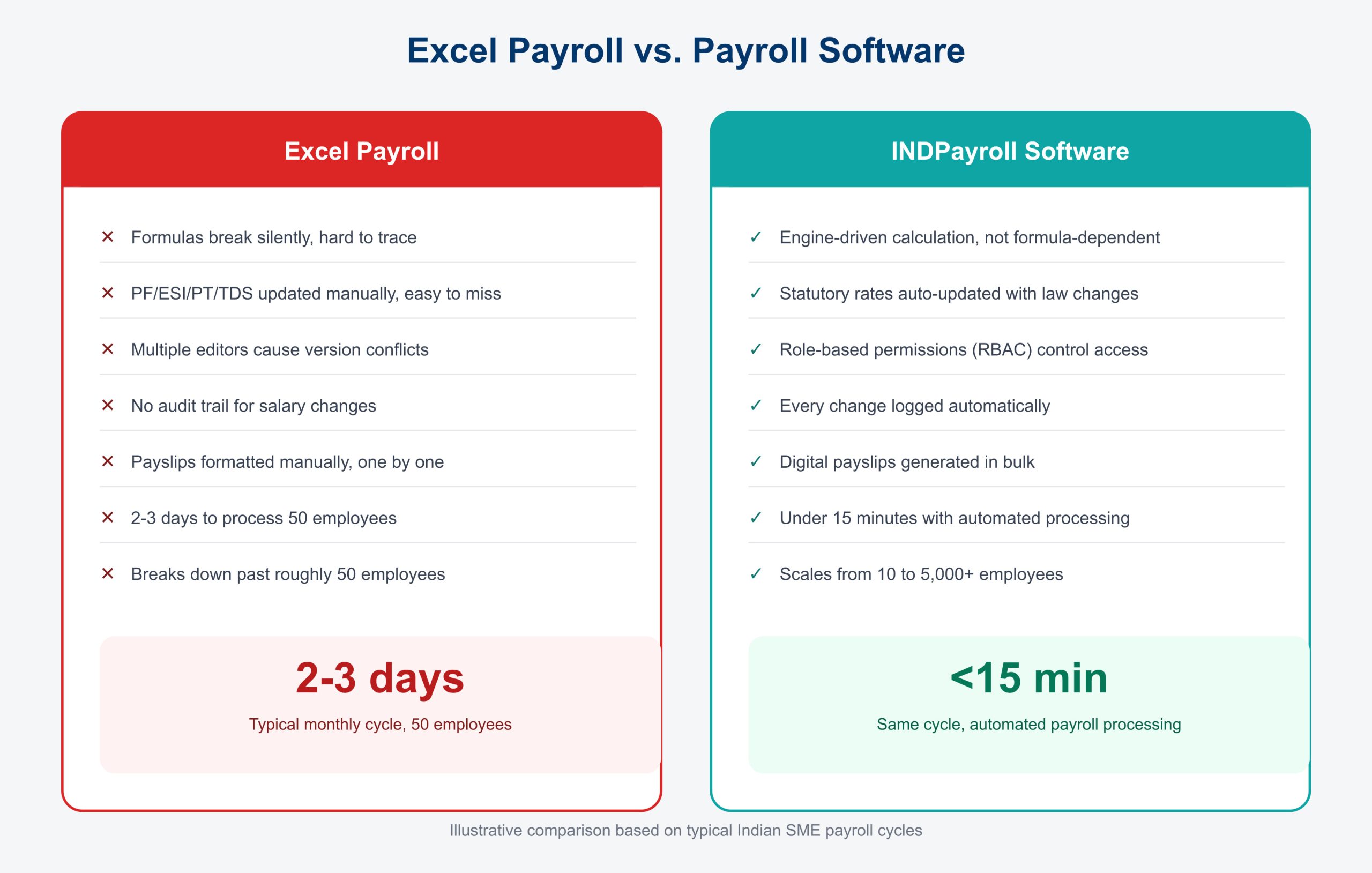
The problems aren’t hypothetical – they show up every single month in businesses running payroll on Excel.
Broken formulas. A single incorrect VLOOKUP or a dragged-and-dropped cell reference can silently miscalculate salaries for an entire department.
Compliance drift. PF, ESI, and PT rates and thresholds change periodically. A spreadsheet doesn’t warn you when a rule has changed – it just keeps calculating with the old numbers.
No audit trail. When a regulator or auditor asks “who changed this employee’s basic salary and when,” most Excel-based teams have no answer.
Version chaos. Multiple people editing the same file over email or shared drives leads to conflicting versions and, eventually, someone processing payroll from the wrong file.
Manual reconciliation. Matching attendance registers against leave records against salary sheets by hand is slow and error-prone, especially with 50+ employees across shifts.
Checklist: Signs You’ve Outgrown Excel Payroll
- Payroll processing regularly takes more than a full day
- You’ve had at least one salary error in the last two payroll cycles
- PF, ESI or PT calculations have needed manual correction
- More than one person edits the payroll sheet
- You can’t produce an audit trail for a salary change on request
- Teams manually reconcile attendance and leave data against pay
- Form 16 or Form 24Q preparation takes days at year-end
- New employee onboarding means retyping data into multiple sheets
Benefits of Payroll Import
Overall, migrating away from spreadsheets isn’t just about avoiding errors – it changes what payroll teams spend their time on.
| Benefit | Manual Payroll | Automated Payroll Import |
| Accuracy | Dependent on individual care | System-validated on entry |
| Speed | Days per cycle | Minutes once data is imported |
| Compliance | Reactive, manual tracking | Built into the payroll engine |
| Employee experience | Delayed, inconsistent payslips | Instant digital payslips via ESS portal |
| Reporting | Manual pivot tables | 40+ ready payroll reports |
| Scalability | Breaks as headcount grows | Same effort at 10 or 1,000 employees |
Instead of re-keying data every month, HR and finance teams do the import once, validate it, and let automated payroll processing take over from there – including PF, ESI, PT, LWF, and TDS compliance, digital payslips, and government-ready ECR export.
How INDPayroll Simplifies Payroll Import
This is where most of the manual risk in payroll import from Excel disappears. INDPayroll designs the payroll import tool specifically for teams moving off spreadsheets – it accepts your existing Excel structure, maps it against employee database fields, custom fields, and salary components, and flags anything that doesn’t fit before it ever touches a payroll run.
Instead of forcing you to rebuild every salary structure from scratch, it supports payroll import with custom fields, so unique data points – cost centers, project codes, grade levels, whatever your business tracks – carry over intact. Attendance import works the same way: the system automatically validates biometric, geo-tagged, or face recognition attendance data (or a plain Excel export from your existing system) against leave records, so the manual reconciliation step disappears.
Once you validate the import, a formula-based salary component builder and salary groups handle the actual gross-to-net calculation, employee onboarding adds new joiners without re-entering existing data, and automated payroll processing takes the entire monthly cycle from days down to minutes – without a single broken formula in sight.
Preparing Excel Before Import
A clean import starts before you ever open the payroll software. Five things need to be right in your Excel files first.
Employee Data Cleanup
Every employee record needs to be complete, consistent, and duplicate-free before import. Inconsistent naming (“Raj Kumar” vs “Raj Kumar” with a double space) is one of the most common reasons imports fail silently.
Checklist: Employee Data Cleanup
- One row per employee, no merged cells
- Employee IDs are unique and consistent across all sheets
- Names match exactly across salary, attendance, and leave sheets
- PAN, UAN, ESI, and Aadhaar numbers are in the correct format
- Date of joining and date of birth use a single consistent date format
- Bank account and IFSC details are verified
- No duplicate employee records across old and new sheets
Salary Structure Validation
Salary structures need to reconcile mathematically – Basic, HRA, LTA, special allowance, and deductions should sum to the stated CTC, and every component needs a home in the target system.
Checklist: Salary Structure Validation
- CTC breakup adds up to the stated annual/monthly CTC
- Basic salary meets minimum statutory percentage requirements
- Clearly separate HRA, LTA, and special allowances
- Distinguish variable pay (bonus, incentive) from fixed pay
- Itemize deductions (PF, ESI, PT, TDS, loan EMI) instead of lumping them together
- Map the salary structure to the correct salary group or template
| Excel Column | Maps To (INDPayroll Field) | Notes |
| Basic | Salary Component: Basic | Statutory minimum applies |
| HRA | Salary Component: HRA | City-based exemption rules |
| Special Allowance | Salary Component: Special Allowance | Balancing figure |
| PF Deduction | Statutory: PF (Employee) | Auto-calculated once mapped |
| ESI Deduction | Statutory: ESI (Employee) | Eligibility threshold applies |
| PT | Statutory: Professional Tax | State-specific slab |
Attendance Validation
Attendance data must match the payroll period exactly – same date range, same employee IDs, and any leave already factored in so pay isn’t counted twice.
Checklist: Attendance Validation
- Attendance period matches the payroll cycle exactly
- Employee IDs match the employee master sheet
- Clearly code present, absent, half-day, and leave days
- Separate overtime hours from regular hours
- Late marks and early exits don’t duplicate as absences
- Deduplicate the biometric or geo-tagged attendance export
Leave Validation
Leave balances carried over from Excel need to match what employees actually believe they have – nothing erodes trust in a new system faster than an incorrect leave balance on day one.
Checklist: Leave Validation
- Confirm opening leave balances with each employee or manager
- Clearly separate leave types (casual, sick, earned, LOP)
- Include leave already approved for future dates
- Capture leave encashment history for F&F calculations
- Document the leave policy (accrual rate, carry-forward limit) for setup
Payroll History Validation
Historical payroll data matters most at year-end – Form 16 and Form 24Q both depend on accurate month-by-month TDS and gross pay figures from earlier in the financial year.
Checklist: Payroll History Validation
- Month-wise gross pay for the current financial year is available
- Document TDS deducted so far in the financial year, per employee
- PF and ESI contributions to date reconcile with challans filed
- Record investment declarations and proofs submitted
- Date and document any mid-year salary revisions
Payroll Import Process
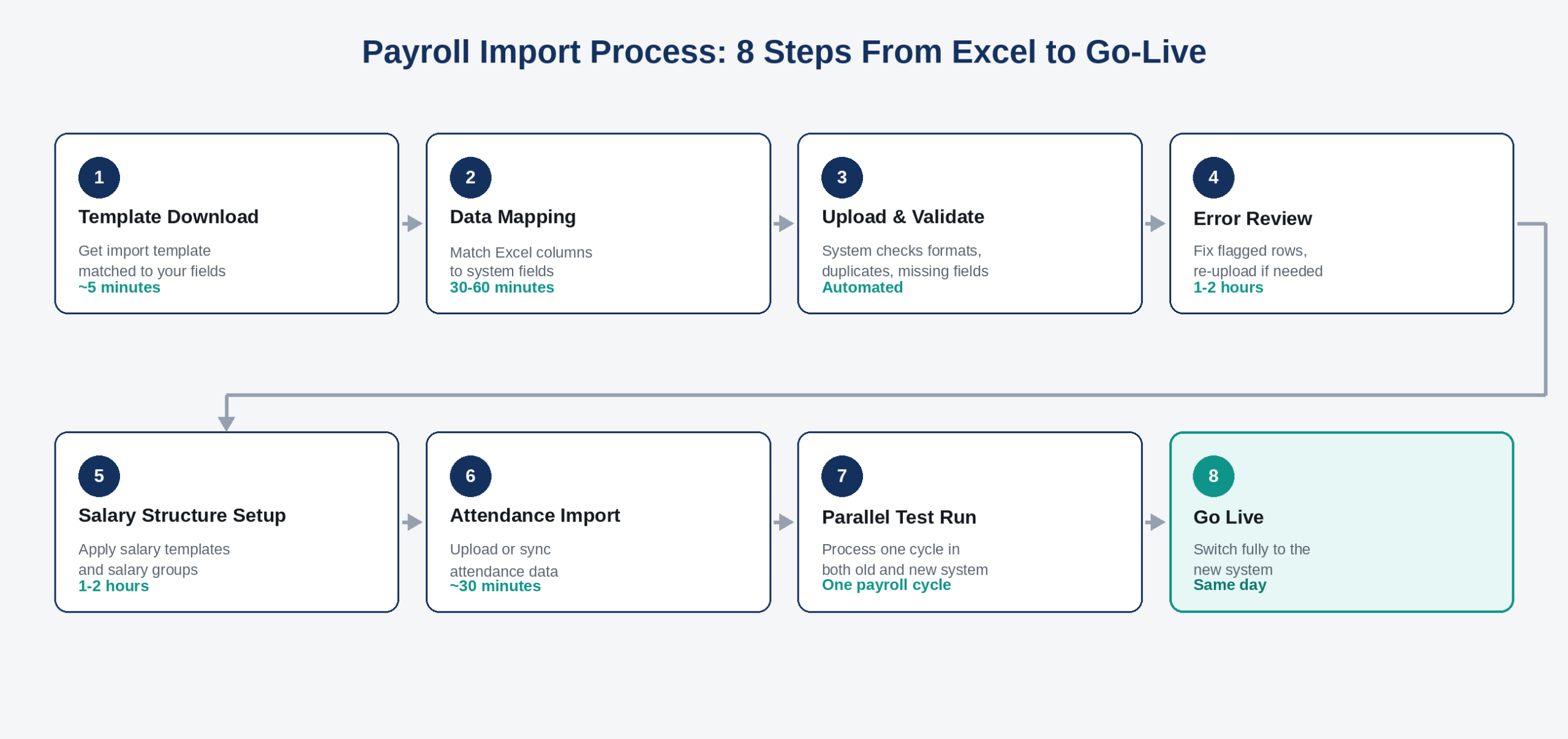
Once you clean and validate your Excel data, the actual payroll import follows a predictable sequence.
Data Mapping
Data mapping is where most self-service payroll imports quietly go wrong. It’s not enough to upload a file – every column in your Excel sheet needs a matching field in the payroll system, and every mismatch needs a decision, not a guess.
| Excel Field | System Field | Common Mapping Mistake |
| Emp Code | Employee ID | Treating text and number formats as different IDs |
| DOJ | Date of Joining | Mixed date formats (DD/MM vs MM/DD) |
| Dept | Department | Free-text departments not matching a standard list |
| CTC Annual | Annual CTC | Confusing monthly and annual figures |
| PF No. | UAN / PF Account Number | Missing leading zeros stripped by Excel |
| Bank A/C | Bank Account Number | Excel auto-formatting long numbers as scientific notation |
A well-built import tool reduces this risk by supporting custom fields directly, so unique data points don’t need to be force-fit into generic columns, and by validating formats (PAN, UAN, IFSC) automatically instead of accepting anything typed into a cell.
Common Payroll Import Errors
Most payroll import failures fall into a short, repeatable list.
| Error | Root Cause | Impact |
| Duplicate employee records | Same employee entered twice under different IDs | Double salary or missed deduction |
| Scientific notation on account numbers | Excel auto-formatting long numeric strings | Failed bank transfer |
| Mismatched date formats | Regional Excel settings (DD/MM vs MM/DD) | Wrong tenure, wrong leave accrual |
| CTC not reconciling to components | Manual addition errors in the sheet | Incorrect gross-to-net calculation |
| Missing statutory IDs | Incomplete onboarding data | PF/ESI filing rejected |
| Attendance-payroll mismatch | Different employee ID formats across sheets | Incorrect LOP deduction |
| Leave balance discrepancy | Opening balance never reconciled | Employee disputes, HR escalations |
How INDPayroll Prevents Payroll Errors
Rather than relying on someone catching these mistakes manually, validation happens on the way in. Format checks catch scientific-notation account numbers and malformed PAN or UAN entries before the system saves them. The formula-based salary component builder flags CTC breakups that don’t reconcile.
Attendance import cross-checks employee IDs against the employee database, so any mismatch surfaces immediately rather than appearing as an incorrect payslip. And because government-ready ECR export and PF, ESI, PT, LWF and TDS compliance run off the same validated data set, a clean import upstream means clean statutory filings downstream – with far less manual double-checking than a spreadsheet-based process ever offered.
Stop Chasing Broken Formulas & Bad Data
Payroll Testing
However, never trust an import blindly, even a validated one. Run at least one full payroll cycle in parallel – old system and new system side by side – and compare results line by line before making the new system the source of truth.
Checklist: Parallel Run Testing
- Process one full payroll cycle in both Excel and the new system
- Compare gross pay, deductions, and net pay for every employee
- Verify PF, ESI, PT, and TDS figures match between both systems
- Check payslip formatting and delivery (email, portal, WhatsApp)
- Confirm attendance-linked pay (LOP, OT) matches expectations
- Get sign-off from finance and at least one department head
Payroll Reconciliation
Reconciliation is the step most teams skip under deadline pressure – and the one most likely to cause a compliance problem later. It means matching every payout, deduction, and statutory contribution back to source documents before you close the books on the migration.
| Reconciliation Item | Source to Match Against | Who Verifies |
| Net pay per employee | Bank transfer statement | Finance |
| PF contribution | PF challan / ECR | HR / Compliance |
| ESI contribution | ESI challan | HR / Compliance |
| TDS deducted | Form 26Q / 24Q draft | Finance / CA |
| Leave balances | Employee acknowledgment | HR |
| Loan/advance deductions | Finance ledger | Finance |
Pre-built payroll reports make this step significantly faster – instead of building pivot tables from scratch, HR and finance teams pull ready-made statutory and management reports (with Excel and PDF export) and reconcile against source documents directly.
Payroll Go Live Checklist
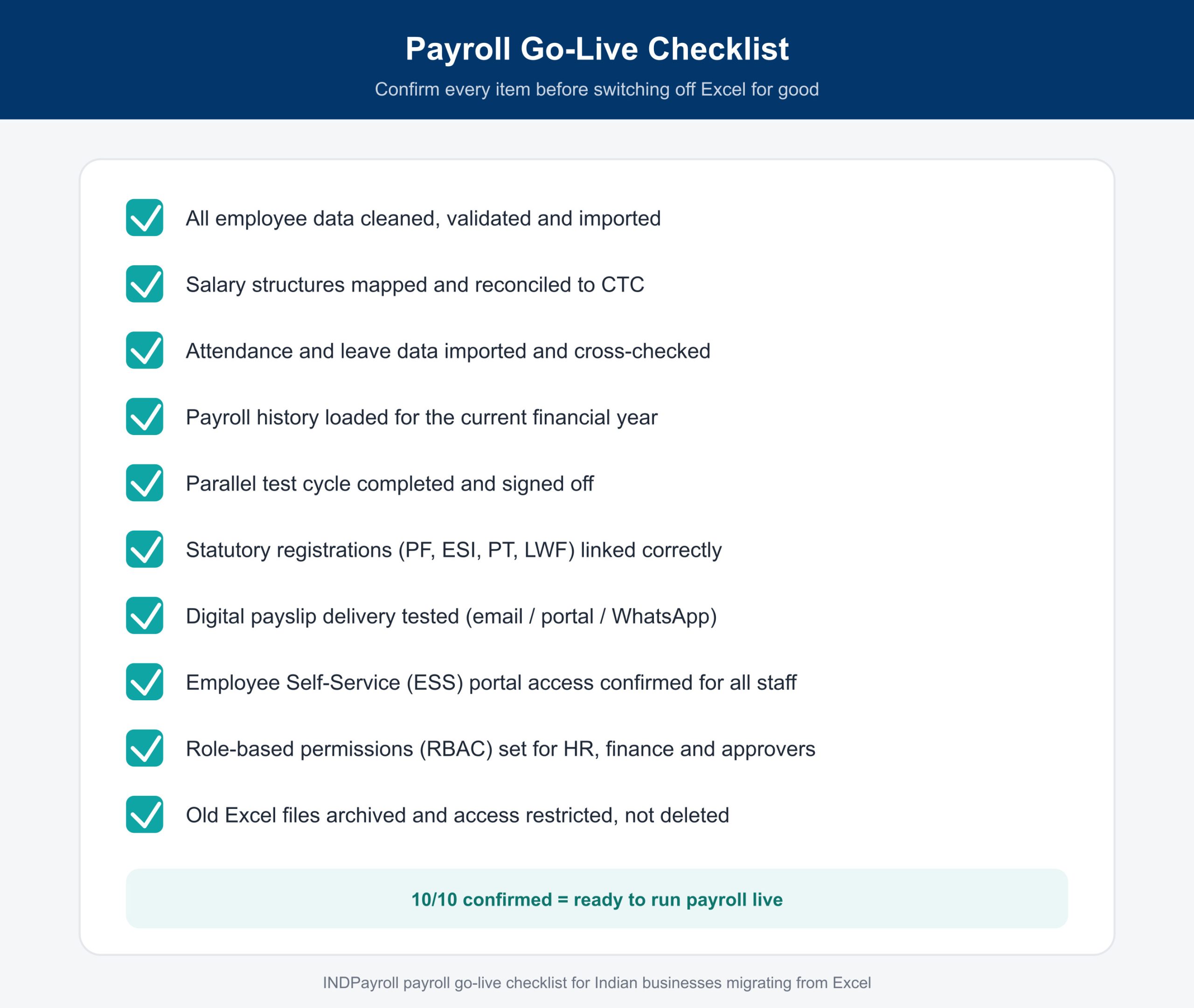
Go-live is the point of no return for most teams, so treat it as a formal milestone, not a formality.
 Payroll Security
Payroll data is among the most sensitive data any business holds – salaries, bank details, PAN numbers and tax information all in one place. Migrating out of shared Excel files is itself a security upgrade, but you need to do it deliberately.
Checklist: Payroll Security
- Old Excel files moved to restricted, access-logged storage (not deleted immediately)
- Role-based permissions applied so only authorized users see full salary data
- Two-factor authentication enabled for payroll admin accounts
- INDPayroll password-protects digital payslips
- Data hosting and encryption standards confirmed with your vendor
- Employee self-service access limited to each employee’s own records
Payroll Compliance
Compliance is the real reason most Indian businesses finally commit to moving payroll import from Excel to dedicated software. PF, ESI, Professional Tax, LWF and TDS each have their own rules, deadlines and filing formats, and a spreadsheet has no way of warning you when a rate or threshold changes. Rules and thresholds for these deductions are set by the Employees’ Provident Fund Organisation (EPFO), the Employees’ State Insurance Corporation (ESIC), and the Income Tax Department respectively – any payroll process, spreadsheet or software is only as accurate as its alignment with these official sources.
| Compliance Area | Filing Requirement | Typical Deadline | Governing Body |
| EPF | Monthly ECR upload | 15th of following month | EPFO |
| ESI | Monthly contribution filing | 15th of following month | ESIC |
| Professional Tax | State-specific monthly/annual return | Varies by state | State commercial tax departments |
| TDS (Form 24Q) | Quarterly statement | 31st of month following quarter | Income Tax Department |
| Form 16 | Annual TDS certificate to employees | 15th June (following FY) | Income Tax Department |
| LWF | State-specific periodic contribution | Varies by state | State labour welfare boards |
A validated payroll import feeds directly into government-ready ECR export and Form 16 generation, so compliance stops being a separate, manual step bolted on after payroll. For teams that want to check specific numbers before migrating, the PF calculator, ESI calculator, TDS calculator and gratuity calculator are useful for spot-checking figures during data cleanup, alongside the official EPFO and ESIC calculators for cross-verification.
Real-World Implementation Scenarios
These composite scenarios reflect common migration patterns seen across INDPayroll’s SME, CA firm, manufacturing and retail customer base. These names serve only as examples; the underlying data problems are the ones payroll teams run into every migration.
Scenario 1: IT Services Firm, 40 Employees, Pune
A 40-person IT services company ran payroll for three years on a single master Excel sheet maintained by one HR executive. When she went on leave during a critical month, the backup staffer couldn’t decipher the nested formulas tracking PF, ESI, and variable pay – payroll for that month went out three days late, and two employees were underpaid due to a formula error that had gone unnoticed for months.
The company migrated using a structured payroll import: data cleanup, salary structure validation, attendance import, and one parallel test cycle. The formula-based salary component builder replaced the fragile spreadsheet formulas, and automated payroll processing brought the monthly cycle down from three days to under an hour, with PF and ESI ECR files generated automatically. Payroll now runs on a two-person backup process instead of a single point of failure.
Scenario 2: CA Firm Managing 12 Client Companies
A CA firm running payroll for 12 SME clients kept a separate Excel workbook per client, each maintained slightly differently depending on which associate set it up. Reconciling PF and ESI challans across clients before filing deadlines meant manually re-checking formulas in twelve different files every month.
Migrating each client onto its own dedicated payroll account standardized the salary structures and statutory calculations across all twelve, while keeping client data segregated. Auto-generated ECR and challan files replaced manual challan preparation, cutting the firm’s pre-filing reconciliation work from roughly two full days to a few hours per cycle.
Scenario 3: Manufacturing Unit with Rotational Shifts, 180 Workers
A manufacturing plant with three rotational shifts tracked attendance on a punch register that staff manually transcribed into Excel before payroll. A formula calculated night-shift differential pay and overtime, but it broke every time a worker moved between shifts mid-month, producing regular disputes over net pay.
After migration, attendance import pulled shift and overtime data directly into payroll, removing the manual transcription step entirely. Salary groups handled the different pay rules for each shift type, and disputes over incorrect overtime pay dropped significantly once workers could see itemized digital payslips through the Employee Self-Service portal.
Scenario 4: Retail Chain, 6 Outlets, Distributed Staff
A retail chain with six outlets across two states processed payroll for each location separately in Excel, with Professional Tax slabs varying by state and no consistent way to track leave across outlets. Head office spent the better part of a week each month consolidating outlet-level sheets into a single payroll run.
Centralizing employee data and salary structures onto one platform let head office run payroll for all six outlets in a single cycle, with state-specific PT slabs applied automatically per employee location. Consolidation time dropped from most of a week to under a day.
Why Businesses Choose INDPayroll
Ultimately, HR managers, payroll managers, finance teams, SMEs, startups, CA firms and growing businesses across manufacturing, retail, healthcare and IT gravitate to the same underlying reason: it removes the manual risk that Excel payroll carries, without forcing a complicated implementation.
| Plan | Best For | Employee Limit | Key Capabilities |
| Free | Micro-teams, CA firms starting out | Small teams | Automated payroll run, digital payslips, standard PF compliance, basic leave tracking |
| Essentials | Growing teams | Up to 200 employees, flat rate | Full TDS, ESI & PT, Form 16, ECR & PF challan generation, custom pay components, standard reports |
| Ultimate | Larger organizations | Unlimited, flat rate | Everything in Essentials plus geo-tagged attendance, shift roster, arrears/bonus, API access, custom report builder, multi-organization management |
Payroll import, employee onboarding, attendance import, salary templates, leave management, payroll reports, digital payslips, PF/ESI/PT/LWF/TDS compliance, government ECR export, Form 16, gratuity and F&F settlement, the ESS portal, shift roster, face recognition and biometric attendance, geo-tagged attendance, role-based permissions, expense management, and 40+ payroll reports all sit inside one platform – rather than a spreadsheet plus five disconnected calculators.
Related tools worth exploring while you plan your migration: Payroll Software, Pricing, Attendance Management, Payroll Reports & Payslips, Payslip Generator, PF Calculator, ESI Calculator, TDS Calculator, Gratuity Calculator, and the full plan comparison.
Key Takeaways
- Payroll import from Excel means moving employee, salary, attendance, and history data from spreadsheets into a payroll system without retyping anything.
- Most Excel payroll failures come from three sources: broken formulas, inconsistent employee IDs, and undetected mismatches between attendance and pay.
- A safe migration always runs one parallel payroll cycle in both systems before fully switching over.
- INDPayroll validates imported data automatically, flags mismatches before processing, and keeps PF, ESI, PT, LWF, and TDS compliant from month one.
- Reconciliation and a go-live checklist matter more than the import itself - most payroll disasters happen after go-live, not during it.
Conclusion
Payroll import from Excel isn’t really about the file upload – it’s about how carefully you clean, validate, and test your data before you trust a new system with everyone’s salary. Businesses that skip data cleanup or parallel testing usually end up recreating the exact problems they migrated to escape.
Get the preparation right – clean employee data, reconciled salary structures, validated attendance and leave, and one full parallel test cycle – and the actual switch to automated payroll processing takes a fraction of the time Excel ever did.
Ready to Move Off Excel?
INDPayroll handles the full journey: bulk employee onboarding, payroll import from Excel with custom fields, attendance integration, automated payroll processing, PF, ESI, PT, LWF and TDS compliance, Form 16 generation, digital payslips, 40+ payroll reports, Employee Self-Service, and shift management – all in one platform built for Indian statutory requirements.
Small teams and CA firms just getting started can choose the Free plan and import their first batch of employees today. If you manage 50 or more employees with attendance, shifts, and multi-company complexity, explore the Essentials or Ultimate plan to see which flat-rate tier fits your team size – you won’t need a credit card to get started.
Frequently asked questions
Run your next payroll in 15 minutes
Trusted by 1,000+ Indian businesses to run compliant payroll, automatically.