
Best Payroll Software for CA Firms Managing Multiple Clients Easily

Introduction
If your CA firm handles payroll for even five or six clients, you already know the drill: each client has a different salary structure, a different payroll cycle, and its own mix of PF, ESI, Professional Tax, and TDS obligations. Multiply that by dozens of employees per client, and manual calculations, repetitive data entry, and last-minute payroll deadlines quickly turn into a source of stress rather than billable value.
Spreadsheets can work when you manage one or two clients. But as client count grows, so does the risk of payroll errors, missed compliance dates, and hours spent producing client-specific reports instead of advisory work. This is exactly the gap that payroll software for CA firms is designed to close – and this guide walks through what it does, what to look for, and how to evaluate options like INDPayroll.
What Is Payroll Software for CA Firms?
Payroll software for CA firms is a platform that lets a chartered accountant, accounting firm, or payroll consultant process and manage payroll for multiple client businesses from a single, organised workspace – instead of maintaining separate spreadsheets or files for each client.
Rather than replacing your professional judgement, it handles the repetitive parts of payroll processing: salary calculations, statutory deductions, payslip generation, and report creation – so your team can focus on review, advisory, and client servicing.
Why CA Firms Need Payroll Software for Multiple Clients
When a firm manages payroll for several businesses at once, a few practical benefits matter more than flashy features:
- Faster payroll processing – salary runs that took hours in a spreadsheet can be completed in a fraction of the time once client data is set up.
- Fewer manual calculation errors – automated formulas reduce (though don’t eliminate) the risk of manual mistakes in salary and deduction calculations.
- Centralised payroll information – client and employee data lives in one system instead of scattered files across desktops and email threads.
- Easier compliance management – PF, ESI, TDS, and Professional Tax calculations are handled within the same workflow as salary processing.
- Automated payslips – digital payslips can be generated and shared without manual formatting for every client.
- Better payroll reporting – client-wise reports are easier to pull together when data is already structured.
- Easier client servicing – firms can respond to client queries faster with organised, accessible records.
- Improved data organisation – historical salary data, employee details, and compliance records stay in one place.
- Reduced repetitive work – less time spent re-entering the same data every month.
- Better scalability – onboarding a new client is faster than building a fresh spreadsheet template from scratch.
It’s worth being clear-eyed here: payroll software doesn’t guarantee error-free payroll or automatic compliance. It reduces manual effort and organises the process, but firms still need to review calculations and stay current with regulatory changes.
Challenges of Managing Payroll for Multiple Clients Manually
Most CA firms that outgrow spreadsheet-based payroll run into the same set of problems:
Version control chaos. When multiple team members update the same client’s payroll file, it’s easy to end up with conflicting versions or overwritten formulas.
Inconsistent salary structures. One client may pay a flat CTC, another may have complex allowances, bonuses, or shift-based pay. Recreating these structures manually in a spreadsheet, client after client, is repetitive and error-prone.
Compliance tracking across clients. PF, ESI, Professional Tax, and TDS deadlines don’t align neatly across clients. Tracking each client’s filing dates manually in a calendar or notes app increases the chance of a missed deadline.
Data scattered across files. Employee records, previous payslips, and compliance documents often live in separate folders, drives, or email attachments – making audits and client queries harder to answer quickly.
Time pressure at month-end. When every client’s payroll is due around the same time, manual processing means your team is racing against the clock rather than reviewing outputs carefully.
Key Features CA Firms Should Look for in Payroll Software
Not every payroll tool is built for firms managing multiple clients. Here’s a practical checklist:
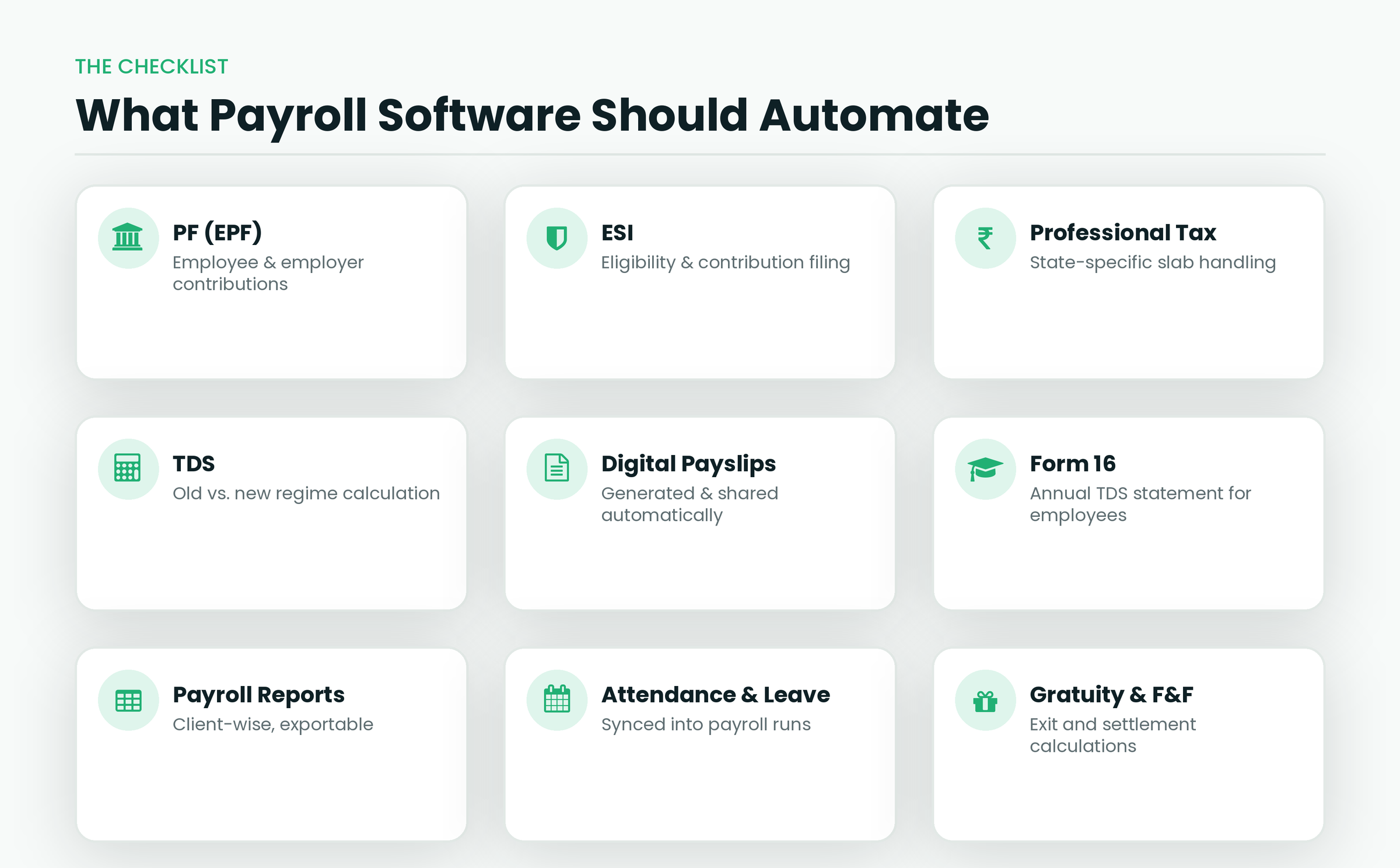
- Multi-client payroll management – the ability to set up and manage separate client accounts or organisations within one platform.
- Employee database – a centralised record of employee details, salary history, and documents per client.
- Salary structure management – flexibility to configure different CTC components (basic, HRA, allowances) for each client.
- Automated payroll calculations – salary, deductions, and net pay computed consistently every cycle.
- Digital payslips – payslips generated and shared electronically instead of manually formatted each month.
- PF, ESI, and TDS compliance support – see INDPayroll’s PF, ESI, and TDS compliance features as an example of how this is typically handled.
- Professional Tax handling – since PT rules vary by state, look for software that accounts for state-specific slabs.
- Form 16 generation – needed for annual TDS reporting to employees.
- Payroll reports – reports that can be filtered or exported client-wise.
- Attendance and leave integration – reduces manual attendance data entry into payroll.
- Full & Final settlement and gratuity calculations – important when employees exit mid-cycle.
- Data import/export – the ability to bring in existing client data rather than starting from scratch.
- Cloud access – useful when your team works across client sites or remotely.
- User access and security controls – role-based access so team members only see the clients or data relevant to their work.
- Client-wise reporting – the ability to generate and share reports specific to one client without exposing others’ data.
Only prioritise the features that actually match your firm’s client mix – a firm handling ten small clients has different needs from one managing a handful of large enterprises.
How Payroll Software Helps CA Firms Manage Multiple Clients
In practice, a typical multi-client payroll workflow looks like this:
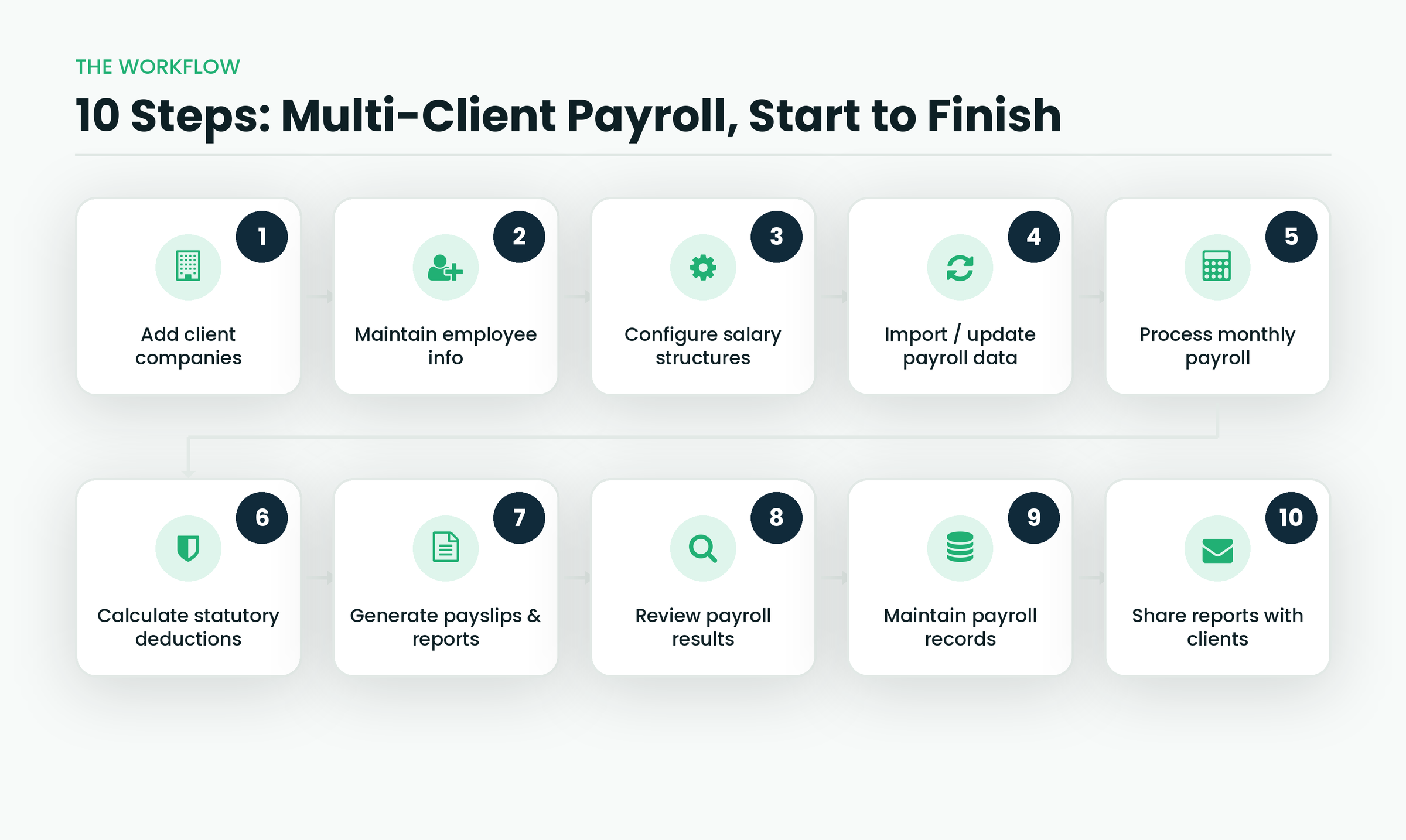
This workflow doesn’t remove the need for professional oversight – it removes the repetitive manual steps, so your team can spend more time on review and client advisory.
Best Payroll Software for CA Firms: What to Consider
There’s no single “best” payroll software for every CA firm – the right choice depends on your practice. Before shortlisting a tool, consider:
- Number of clients you currently manage and expect to manage in the next year or two.
- Number of employees per client, and the range across your client base.
- Payroll complexity – do clients have simple flat salaries, or complex structures with shifts, overtime, and variable pay?
- Compliance requirements – do your clients span multiple states with different Professional Tax rules?
- Reporting requirements – do clients need specific report formats or frequencies?
- Ease of use – can your team, and possibly client-side staff, learn the tool without extensive training?
- Scalability – can the software handle client growth without a costly re-platforming later?
- Data security – how is client and employee data stored and protected?
- Integrations – does it connect with attendance systems, accounting tools, or HR software you already use?
- Pricing – is the cost structure (per employee, per client, or flat fee) workable across your client portfolio?
- Customer support – what support is available when you’re processing payroll for multiple clients under deadline pressure?
Once you’ve mapped these against your firm’s actual client base, it becomes much easier to shortlist two or three tools worth trialling rather than choosing based on price or marketing alone.
Why CA Firms Can Consider INDPayroll for Managing Payroll
INDPayroll is a cloud payroll software built for Indian businesses, and it includes a few capabilities relevant to firms handling multiple clients:
- Multi-client account management, with dedicated accounts per client rather than one shared workspace.
- A CA & Payroll Consultant program, listed on INDPayroll’s pricing page, that covers multi-organisation management, per-client billing, volume-based pricing, bulk onboarding, and consolidated reporting – worth a direct conversation with INDPayroll if your firm fits this profile.
- Automated PF, ESI, Professional Tax, and TDS calculations, along with Form 16 generation, as part of its PF and ESI compliance features.
- Digital, password-protected payslips distributed through an employee self-service portal.
- Free calculators – including a PF calculator, TDS calculator, CTC calculator, and gratuity calculator – that can be useful even before you commit to a full platform.
- India-based data hosting with encryption for client and employee data.
- Multiple pricing tiers, including a free plan for up to 10 employees, which can be a low-risk way to trial the platform on one small client before rolling it out further.
As with any software, the right move is to evaluate INDPayroll’s current plans and features directly against your firm’s client count, compliance needs, and budget – you can explore the INDPayroll pricing page or try the platform to see how it fits your workflow.
Manual Payroll vs. Payroll Software: A Quick Comparison
| Requirement | Manual/Spreadsheet Payroll | Payroll Software |
| Payroll calculations | Manual, formula-dependent | Automated |
| Payslips | Manually created and formatted | Digitally generated |
| Compliance tracking | Manual deadline tracking | Software-assisted |
| Payroll reports | Time-consuming to compile | Faster to generate |
| Managing multiple clients | Difficult to keep organised | Easier with dedicated client accounts |
| Employee records | Scattered across files | Centralised per client |
| Scalability | Limited as client count grows | Generally better suited to growth |
How to Choose the Right Payroll Software for Your CA Firm
Use this checklist when evaluating options: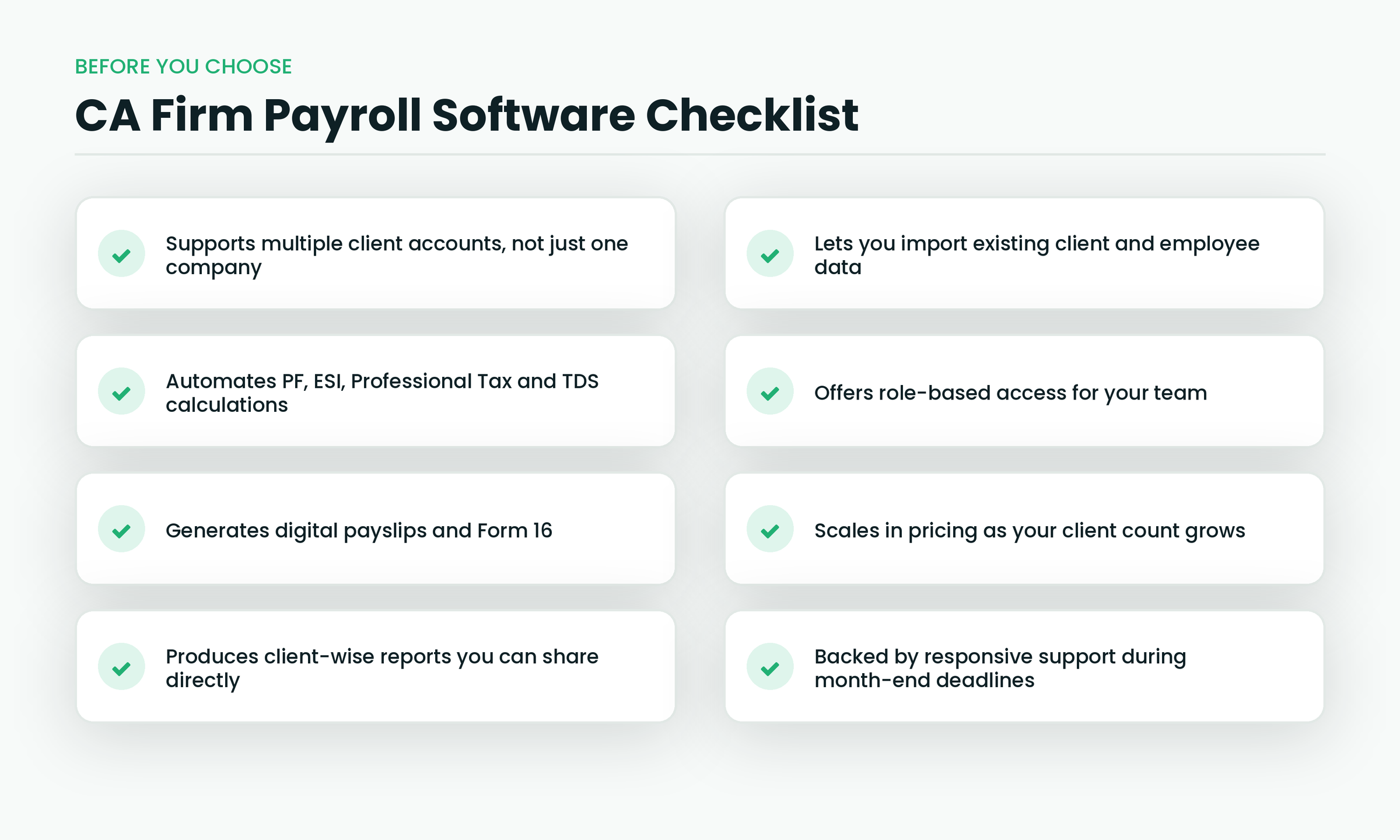
Common Mistakes CA Firms Should Avoid
- Choosing software based only on price- the cheapest plan may not support the client volume or compliance features you need.
- Ignoring compliance requirements – verify PF, ESI, PT, and TDS handling before committing, especially if clients span multiple states.
- Not checking reporting capabilities – confirm the software can produce the specific reports your clients expect.
- Using too many disconnected tools – stitching together separate systems for attendance, payroll, and reporting recreates the same fragmentation that spreadsheets caused.
- Failing to verify data security – ask how client and employee data is stored, encrypted, and backed up.
- Not testing the workflow before implementation – run a pilot with one client before migrating your entire client base.
- Choosing software that doesn’t scale – a tool that works for five clients may not hold up at twenty-five.
Simplify Multi-Client Payroll Today
Conclusion
Managing payroll for multiple clients manually is workable at a small scale, but it doesn’t stay that way for long. As client count and employee numbers grow, the right payroll software for CA firms can reduce repetitive work, organise compliance tasks, and make client reporting faster – without replacing the professional oversight your firm already provides. Whichever platform you choose, evaluate it against your actual client mix, compliance needs, and growth plans rather than price alone. If you’re exploring options, INDPayroll’s multi-client and CA-focused features are worth reviewing as part of that shortlist.
Ready to see how it fits your practice? You can explore INDPayroll’s payroll software or check its pricing plans, including the CA & Payroll Consultant option, to decide if it’s the right fit for your firm.
Frequently asked questions
Run your next payroll in 15 minutes
Trusted by 1,000+ Indian businesses to run compliant payroll, automatically.
Keep reading
9 September 2026 · 10 min
Manufacturing26 August 2026 · 11 min
Payroll Management4 August 2026 · 24 min